
Table of Contents
- 10 Minimalist Lightroom Presets for Clean Edits
- 1. Clean White Preset
- 2. Soft Neutral Preset
- 3. Minimal Haze Preset
- 4. Pure Black and White Preset
- 5. Subtle Fade Preset
- 6. Crisp Clarity Preset
- 7. Airy Pastel Preset
- 8. Flat Matte Preset
- The WHITE Photo // Lightroom Minimalist Edit Tutorial
- 9. Ethereal Glow Preset
- 10. Ultimate Clean Preset
- Conclusion
- FAQs
10 Minimalist Lightroom Presets for Clean Edits
Minimalist Lightroom presets are designed to simplify photo editing while maintaining a polished, natural look. They adjust exposure, contrast, and colors subtly, making them ideal for lifestyle, portrait, product, and architectural photography. These presets work on both desktop (Mac/Windows) and mobile (iOS/Android) platforms, using formats like .XMP, .lrtemplate, and .DNG.
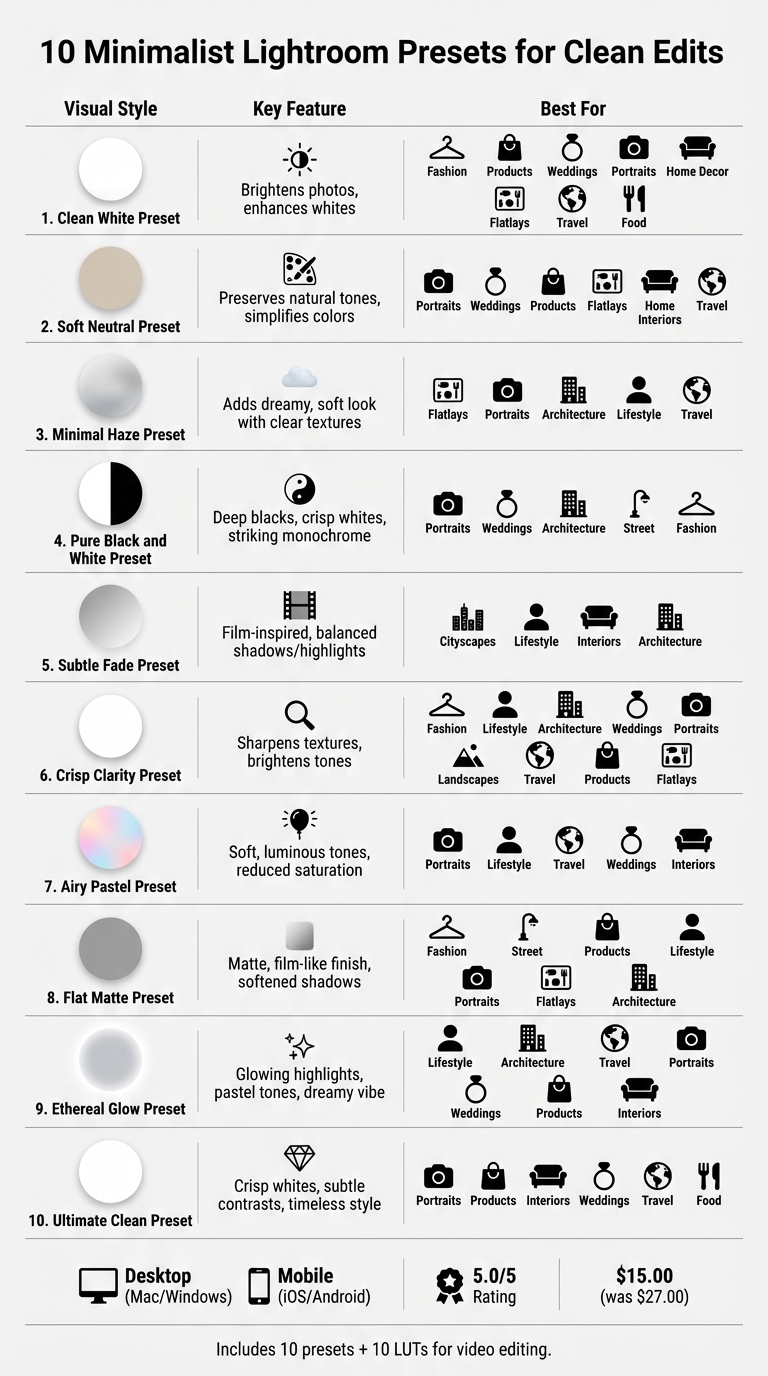
Here’s a quick rundown of the 10 presets covered:
- Clean White Preset: Brightens photos, enhances whites, and works well for various photography styles.
- Soft Neutral Preset: Preserves natural tones and simplifies colors for a sleek finish.
- Minimal Haze Preset: Adds a dreamy, soft look while keeping textures clear.
- Pure Black and White Preset: Creates striking monochrome edits with deep blacks and crisp whites.
- Subtle Fade Preset: Balances shadows and highlights for a film-inspired effect.
- Crisp Clarity Preset: Sharpens textures and brightens tones for a clean, professional look.
- Airy Pastel Preset: Delivers soft, luminous tones with reduced saturation for a light-filled aesthetic.
- Flat Matte Preset: Offers a matte, film-like finish with softened shadows.
- Ethereal Glow Preset: Adds glowing highlights and pastel tones for a dreamy vibe.
- Ultimate Clean Preset: Focuses on crisp whites and subtle contrasts for a timeless style.
These presets save time with one-click edits and can be customized to fit your style using Lightroom’s opacity slider and other tools. Many collections, like those from Presets.io, include guides and tutorials, making installation straightforward. Priced at $15.00 (discounted from $27.00), the Minimalist Preset Collection offers 10 presets for desktop and mobile, plus 10 LUTs for video editing, with a 5.0/5 rating from users.
For consistent, clean edits, minimalist presets are an efficient choice that simplifies your workflow while delivering professional results.
10 Minimalist Lightroom Presets Comparison Chart
1. Clean White Preset
Brightens and Simplifies Photos
The Clean White Preset creates a bright, polished look with pure tones and soft shadows, making images feel crisp and professional. By adjusting the white balance, it enhances whites and sharpens details, removing distractions and giving photos an editorial edge. This style aligns perfectly with the popular "Clean Girl" aesthetic often seen on Instagram and influencer blogs.
This preset is designed to adapt effortlessly to a variety of photography needs.
Versatile Across Photography Styles
Whether you're shooting fashion, skincare, products, weddings, portraits, home decor, flatlays, travel, or food, this preset delivers consistent results. It’s especially effective for indoor shots, enhancing vibrancy and clarity. Plus, it has been tested to ensure it works beautifully across all skin tones, making it ideal for portrait photography.
Compatible and Easy to Use
The preset is user-friendly and works seamlessly with Lightroom on both desktop (Mac/Windows) and mobile (iOS/Android). It’s available in DNG, XMP, and lrtemplate formats, enabling quick, one-click edits.
Customizable for Any Lighting
One of its standout features is its adjustability. You can tweak exposure, warmth, and opacity to match different lighting conditions. Start with the preset, then make small adjustments to fine-tune your photo’s look. This flexibility allows you to maintain the minimalist style while tailoring it to your specific needs.
With its combination of ease, adaptability, and professional results, the Clean White Preset is an excellent choice for achieving a sleek, minimalist aesthetic.
sbb-itb-b27063b
2. Soft Neutral Preset
Simplifies and Elevates Your Photos
The Soft Neutral Preset offers a sleek, polished look with subtle adjustments and clean tones. It brightens images while preserving natural skin tones, giving photos a crisp, professional finish. By toning down distracting colors, it creates a cohesive style that’s ideal for Instagram feeds or portfolio presentations.
"I used Soft Truffle Warm and it gave the perfect effect I was looking for! Especially since I was shooting on a very gray and cloudy day." - Leilani
Versatile Across Photography Styles
This preset isn’t limited to one type of photography - it works beautifully across a variety of genres. Whether you’re shooting portraits, weddings, product displays, flat lays, home interiors, or travel scenes, it ensures a consistent and refined look. Its flexibility shines through, adapting to different subjects and lighting conditions with ease. Plus, it’s simple to use on any device.
Designed for Desktop and Mobile
The preset is compatible with Lightroom on both desktop (Mac/Windows) and mobile devices (iOS/Android). Available in DNG, XMP, and lrtemplate formats, it allows for quick, one-click edits. Even if you’re new to photo editing, you can achieve professional-quality results effortlessly.
Customizable for Your Vision
While the preset is ready-to-use, it’s also fully adjustable to suit your style. You can tweak exposure, warmth, and opacity to match your unique vision, all while keeping the clean, minimalist aesthetic intact.
3. Minimal Haze Preset
Captures a Clean, Dreamy Look
The Minimal Haze Preset gives your photos a soft, dreamy quality while keeping them modern and uncluttered. By removing distractions, it emphasizes natural textures, allowing the essence of your image to take center stage. The subtle "haze" effect adds an artistic touch that feels polished yet organic - ideal for photographers aiming for an airy, refined aesthetic. With its minimal color adjustments, this preset ensures your photos stay true to their original tones while receiving just the right touch of enhancement. The result? A consistent, clean look perfect for a minimalist portfolio.
Versatile Across Photography Styles
This preset isn't limited to one type of photography - it works seamlessly across different genres. Whether you're capturing flat lays, portraits, architecture, lifestyle moments, or travel scenes, it maintains a cohesive minimalist feel. It’s equally effective in bright outdoor lighting or softer indoor settings, giving you flexibility no matter the environment.
"These presets brought my photos to life in the simplest way possible. They are subtle but make such a difference!" - Sofia F.
Simple to Use on Any Device
Designed for ease, the Minimal Haze Preset works with Lightroom on both desktop (XMP) and mobile (DNG). Apply it with a single click on iPhone, Android, Lightroom CC, or Lightroom Classic. Plus, your original image data stays untouched, so you can experiment freely without worry.
Customizable for Every Shot
While the preset delivers instant results, it’s also fully adjustable to suit your style. Use the opacity slider to tweak the strength of the haze - dial it down for a more subtle look or turn it up for a dreamier effect. You can also fine-tune exposure and warmth to match your photo’s lighting, all while preserving its clean, minimalist vibe.
4. Pure Black and White Preset
Highlights a Clean, Minimalist Style
The Pure Black and White Preset transforms images into a striking mix of deep blacks, crisp whites, and elegant monochrome tones, offering a sleek, minimalist aesthetic. By removing color, it draws attention to the essentials - composition, texture, and light. This classic yet modern look is ideal for creating a cohesive Instagram feed or showcasing a polished portfolio. Its versatility makes it a go-to choice for various photography styles.
"These presets make my feed look so chic." – Katie, Verified User, Play Presets
Versatile Across Photography Styles
Whether you're shooting portraits, weddings, architecture, street scenes, or fashion, this preset delivers consistently stunning results. The monochrome conversion is designed to maintain a natural appearance, avoiding the overly processed look that can sometimes plague black-and-white edits.
"I love that the black and white doesn't get too washed out, it looks very professionally taken even on an iPhone!" – Miranda, Verified User, Lou & Marks Presets
Compatible with Desktop and Mobile
This preset is designed to work effortlessly on both Lightroom Desktop (Mac/Windows) and Lightroom Mobile (iOS/Android). Desktop users can apply XMP files, while mobile users can use DNG files for quick, professional edits. No matter your platform, achieving a polished black-and-white look is simple and efficient.
Fully Adjustable for Your Needs
Take control of your edits with adjustable settings. Use the opacity slider (from 0% to 200%) to fine-tune the intensity, and modify exposure, contrast, and tonal range to suit your photo's specific lighting and mood. This flexibility ensures the preset fits seamlessly with your creative vision.
5. Subtle Fade Preset
Adds a Clean, Modern Touch
The Subtle Fade Preset is perfect for those who love clean, understated aesthetics. Inspired by a film-like look, it carefully balances shadows and highlights to create a polished yet natural vibe. By tweaking exposure, contrast, and clarity, it enhances the beauty of photos without overpowering them. The result? Soft tones and smooth transitions that give your images a modern, minimalistic feel.
"This preset subtly adjusts exposure, contrast, and clarity to bring out the beauty of your images while maintaining a refined simplicity." – Flourish Presets
Users rave about its ability to elevate photos without making them look overdone. Maria, a verified user, shared, "Minimalist as it is. Easy to use and looks nice!" With an impressive 5/5 star rating, this preset consistently delivers a sophisticated yet effortless look, making it a favorite for a variety of photography styles.
Versatile for Different Photography Styles
The subtle fade effect works wonders across multiple genres of photography. It adds depth to cityscapes, highlighting details in shadows without adding unnecessary complexity. Whether you're capturing lifestyle moments, interior spaces, or architectural designs, this preset maintains a professional and minimalist aesthetic that complements each shot beautifully.
Designed for All Devices
This preset is built for convenience, offering a one-click editing experience that works seamlessly on both desktop and mobile devices. No matter where you choose to edit, you can count on consistent, high-quality results.
Simple Customization Options
Adjusting the preset to suit your style is a breeze. Use the opacity slider to control the intensity of the fade or tweak exposure and warmth to match your photo’s lighting. For the best results, apply it to images with natural lighting and interesting textures, like outdoor scenes or minimalist interiors. It’s an excellent starting point for creating a look that reflects your personal vision.
The Seasons Bundle

$39.00
$135.00
The Seasonal Bundle brings together a versatile range of Lightroom presets inspired by the shifting tones and textures of the year — from cool, muted winter scenes to rich, golden autumn light. Inside, you’ll find collections like Winter, Gingerbread, Old… continue reading
6. Crisp Clarity Preset
Elevates a Minimalist Look
The Crisp Clarity Preset fine-tunes exposure, contrast, and clarity to bring out natural textures while delivering clean, bright tones. The result? A polished, minimalist aesthetic that feels both professional and effortless.
"Perfect for anyone wanting a natural vibe in their photos. These presets add the right amount of brightness and clarity." – Bella M., Verified Buyer, Flourish Presets
Its precise sharpening and subtle brightness adjustments help maintain the understated elegance of minimalism.
Versatile Across Photography Styles
Whether you're shooting fashion, lifestyle, architecture, weddings, portraits, landscapes, or travel, this preset performs beautifully. It’s particularly effective for product photography and flat lays, where clean whites and natural colors ensure your subject stands out.
Betsy Davis, owner of Betsy Davis Photography, shared her experience:
"These presets are fantastic! The organizational thought behind their format made it easy to progress seamlessly through the editing process... I was most impressed with their versatility across so many types of images and light sources."
This flexibility, paired with its user-friendly design, makes the Crisp Clarity Preset a dependable option for a wide range of editing needs.
Compatible with Desktop and Mobile
Available in both XMP (Desktop) and DNG (Mobile) formats, this preset allows for quick, one-click edits on any device, making it convenient for photographers on the go.
Fully Adjustable for Personal Style
Designed for a non-destructive workflow, the preset lets you tweak exposure, white balance, and contrast without losing clarity. You can even adjust the intensity using an opacity slider to match your creative vision. Many versions include "easy adjust" tools for fast exposure fixes. For optimal results, begin with well-exposed images and use RAW files whenever possible to retain clean highlights and natural tones. If your image feels flat, try increasing contrast or lowering blacks to bring back depth.
7. Airy Pastel Preset
Adds a Soft, Minimalist Glow
The Airy Pastel Preset is all about delivering a soft, luminous touch that complements minimalist photography. By enhancing midtones and gently lifting shadows, it creates a clean and polished look. Its subtle pastel tones and reduced saturation give photos an elegant, airy finish that feels both refined and effortless.
Joey Kamphuis from The Editing Studio explains this aesthetic perfectly:
"Light and airy is not just 'brighter photos.' It's a specific relationship between exposure, highlights, shadows, and color that creates a sense of soft luminosity rather than harsh brightness."
This preset also features a smooth highlight roll-off, ensuring bright areas retain detail without looking washed out. Whites stay crisp and true, avoiding a dull or hazy appearance. A slight softening of clarity and texture adds a dreamy, ethereal vibe to your images.
Versatile Across Different Photography Styles
Whether you're shooting portraits, lifestyle scenes, travel adventures, weddings, or interior spaces, this preset adapts beautifully. It works especially well in natural light, making it a go-to for photographers aiming for a light-filled, professional aesthetic.
Interestingly, it's gained traction in Airbnb-style interior photography, where clean and inviting images can make a big difference in attracting bookings.
One user, Aida Ponce, shared her experience:
"In love with this preset. It gives a clear, light, clean, airy aspect and it's suitable FOR ALL KIND OF PICTURES."
For portraits, the preset enhances skin tones by adjusting orange luminance, ensuring a natural, vibrant look without over-saturation or dullness.
Simple to Use on Any Device
The Airy Pastel Preset is available for both Lightroom Mobile (DNG format) and Lightroom Desktop (XMP format). With just one click, you can transform your photos. For mobile users, reducing sharpening and clarity can help counteract heavy HDR processing for a smoother finish.
Its user-friendly design ensures that even beginners can achieve professional-looking edits while keeping the minimalist vibe intact.
Easily Adjustable to Suit Your Needs
While the preset is designed for quick application, it offers plenty of room for customization. Adjust the white balance before applying to avoid unnatural skin tones. If your photo is already well-exposed, you might want to slightly lower the exposure after applying the preset to prevent over-bright highlights. For a subtle boost in depth, try lifting the "Whites" by +5 to +15 instead of increasing contrast.
This flexibility makes the Airy Pastel Preset a reliable tool for creating soft, light-filled images tailored to your personal style.
8. Flat Matte Preset
Creates a Minimalist Look
The Flat Matte Preset simplifies your photos by lifting blacks and softening shadows, giving them a matte, film-like finish. It reduces highlight intensity and tones down saturation, creating a unified image with gentle contrast. This stripped-back style is perfect for achieving a clean, minimalist aesthetic.
Versatile Across Photography Styles
This preset works well across various genres, including fashion, street, product, and lifestyle photography. Whether you're capturing portraits, flat lays, or architectural details, the matte effect maintains a polished and consistent look. It has also been tested on different skin tones, ensuring natural and smooth results for portrait shots.
Compatible with Desktop and Mobile
You can apply the Flat Matte Preset effortlessly with one-click edits on Lightroom Mobile (DNG), Lightroom Desktop (XMP, lrtemplate), and Adobe Photoshop via Camera Raw. The download includes instant access and lifetime updates, making it convenient for both casual and professional use.
Customizable for Your Style
Although the preset delivers excellent results right away, you can fine-tune it to suit your specific needs. Use the opacity slider to adjust its intensity and tweak exposure or warmth to match your lighting setup. These flexible options make it easy to incorporate the Flat Matte Preset into your minimalist editing routine.
The WHITE Photo // Lightroom Minimalist Edit Tutorial
9. Ethereal Glow Preset
The Ethereal Glow Preset brings a soft, dreamy vibe to your photos. It enhances images with glowing highlights and pastel tones, giving them a polished, almost otherworldly feel. By making subtle adjustments to exposure and contrast, it creates smooth transitions that align beautifully with minimalist photography styles.
Perfect for Various Photography Styles
This preset shines across many genres, including lifestyle, architecture, travel, portraits, weddings, product shots, and interior photography. Its romantic, hazy glow is a favorite among wedding and portrait photographers. From warm, inviting hues to cool, soothing tones, its versatility makes it suitable for almost any type of photography.
Compatible on Desktop and Mobile
Designed for ease, this preset offers a one-click, non-destructive workflow. It works effortlessly on both desktop and mobile platforms, supporting DNG, XMP, and lrtemplate formats. Whether you're using the free Lightroom Mobile app (iOS/Android) or Lightroom Desktop and Photoshop, it integrates seamlessly.
Customizable to Match Your Style
You can easily tweak this preset to fit your creative vision. Adjust the glow intensity with the opacity slider, and fine-tune exposure and warmth for a natural look. After applying the preset, small adjustments ensure skin tones and textures stay true to life, keeping your edits clean and balanced.
10. Ultimate Clean Preset
The Ultimate Clean Preset is all about simplicity and elegance. It creates crisp whites, soft contrasts, and a polished finish by focusing on the essentials. With just one click, you can give your photos a professional, timeless look.
Perfect for a Minimalist Look
This preset enhances photos with deep blacks and bright whites, delivering a clean, uncluttered aesthetic. By stripping away unnecessary color distractions, it highlights the key elements - composition, lighting, and the subject itself - without overpowering the image.
Versatile Across Photography Styles
From portraits and product shots to interiors, weddings, travel, and food photography, this preset works seamlessly across a variety of genres. It’s been carefully designed to maintain natural skin tones while subtly neutralizing backgrounds. Whether you're editing family portraits or creating commercial flat lays, this preset adapts effortlessly to your needs.
Compatible with Desktop and Mobile
Designed for ease of use, the preset comes in multiple formats: DNG for the free Lightroom Mobile app (iOS/Android) and XMP or lrtemplate files for Lightroom Classic, Lightroom CC, and Photoshop on Mac and Windows. These formats ensure non-destructive editing, meaning your original photo remains untouched while edits are applied as reversible layers.
Customizable for Your Style
While it’s optimized for one-click edits, this preset also allows for fine-tuning. You can adjust white balance, highlights, exposure, and warmth to match your vision. Many versions include an opacity slider, giving you control over the intensity of the effect and further customization options for your photos.
Conclusion
Minimalist Lightroom presets can completely transform your editing workflow, giving your photos a clean, polished look. By removing unnecessary distractions, these presets let you concentrate on the essentials - composition, lighting, and your subject. Whether you're working on portraits, product photography, interiors, or lifestyle shots, this streamlined approach simplifies the editing process and ties your creative vision together.
Finding the right preset for your needs is key. For instance, the Clean White Preset works wonders for interior shots by balancing colors, while "Light Coverage" presets are perfect for portraits, preserving natural skin tones. As Artifact Uprising explains:
"These saved settings... give us the freedom to explore a unique look in each shot, while always making sure we stay true to our desired aesthetic".
These presets are compatible with both Lightroom Desktop and the free Lightroom Mobile app, making it simple to maintain your workflow across devices.
The Minimalist Preset Collection, available on Presets.io, offers a great starting point for achieving a clean and cohesive style. Priced at $15.00 (discounted from $27.00), the collection includes 10 presets for mobile and desktop use, along with 10 LUTs for video editing. It’s received a 5.0/5 star rating from verified users who describe it as "easy to use" and visually stunning.
Start experimenting with different presets to find the ones that best match your creative vision. Minimalist presets not only save time but also help you develop a consistent and recognizable style in your photography.
FAQs
What preset works best for low-light or cloudy photos?
When working with photos taken in low-light or cloudy conditions, a preset designed for overcast settings can make a big difference. For example, the 'How to Edit Overcast Photos in Lightroom' preset is specifically crafted to bring out the details and improve the tones in such images. It ensures your photos look polished and professional, even in less-than-ideal lighting.
How do I reduce a preset’s strength without changing the look?
To tone down a preset's effect without changing its appearance, tweak the opacity or intensity settings. In Lightroom Mobile, you can tap the preset icon and adjust the Opacity Slider to reduce its strength. For Lightroom, the Amount slider lets you refine the preset's intensity. If you're using Lightroom Classic, third-party tools like The Fader can help you manage the preset's impact while maintaining its intended look.
Will these presets keep skin tones looking natural?
Presets are thoughtfully created to keep skin tones looking natural. They offer variations suited for different skin tones and lighting setups, helping you achieve consistent and lifelike results in your edits.