
Table of Contents
- Best Presets for Dramatic Atmosphere
- Dramatic & Cinematic Lightroom Editing Tutorial Free Preset - @watchluke - DARK SMOOTH RICH TONES
- 1. Dark & Dramatic Landscapes Preset
- 2. Dramatic Preset
- 3. Movie Star Preset
- 4. Urban City Night Preset
- 5. Warm Cinematic Film Preset
- 6. NY Skyline Preset
- 7. Desert Sun Preset
- Before and After Comparison Tables
- Conclusion
- FAQs
Best Presets for Dramatic Atmosphere
Creating a dramatic atmosphere in photography is easier with Lightroom presets. These tools adjust shadows, highlights, and colors to give your photos a bold, cinematic look in just one click. From landscapes to portraits, presets like Dark & Dramatic Landscapes, Dramatic Preset, and Urban City Night provide tailored effects for different styles. Many are affordable, starting at $12.00, with some even available for free.
Key Takeaways:
- Dark & Dramatic Landscapes: Perfect for moody outdoor shots with balanced shadows and highlights.
- Dramatic Preset: Adds contrast, softens colors, and uses teal-orange tones for a cinematic feel.
- Movie Star Preset: Inspired by classic films, ideal for portraits with warm, dramatic tones.
- Urban City Night: Highlights neon lights and shadows in nighttime cityscapes.
- Warm Cinematic Film: Delivers vintage-style warmth, great for portraits and golden hour shots.
- NY Skyline Preset: Enhances cityscapes with bold contrasts and teal-orange grading.
- Desert Sun Preset: Captures the intensity of sunlit landscapes with deep orange tones.
Explore these presets or the Master Preset Bundle on Presets.io, where collections start at Explore these presets on Presets.io, where collections start at $12.002.00, or download select options for free. Whether you're editing on desktop or mobile, these presets simplify the process and elevate your photos with professional-quality effects.
Dramatic & Cinematic Lightroom Editing Tutorial Free Preset - @watchluke - DARK SMOOTH RICH TONES
sbb-itb-b27063b
1. Dark & Dramatic Landscapes Preset
The Dark & Dramatic Landscapes Preset is designed to bring out the hidden beauty of landscapes by carefully balancing light and shadow. It reduces the brightness of whites and highlights, uncovering details in bright areas like cloud formations or building facades. At the same time, it brightens shadows just enough to reveal textures in the darkest parts of the image, such as rocky surfaces or dense foliage. The result? A harmonious balance that keeps the mood intact while showcasing intricate details. It also enhances midtone clarity, adding depth and texture to your photos.
High Contrast and Shadow Depth
One standout feature of this preset is how it sharpens midtone clarity, which adds definition to textures in elements like rocks, trees, and architectural details. A great example is the popular Northlandscapes Dark & Dramatic pack, known for delivering consistently striking results. According to Jan Erik Waider, the professional landscape photographer behind the Northlandscapes pack:
"The presets unfold their full power in coastal, forest and mountain landscapes with clouds, fog or overcast skies".
The Northlandscapes Dark & Dramatic pack, priced at $35.00, has earned an impressive 4.9/5 rating from 79 reviews.
Suited for Multiple Photography Styles
While it shines in Nordic-inspired landscapes - think Iceland's glaciers or Norway's fjords - this preset isn't limited to traditional scenery. Its versatility makes it a favorite among wildlife photographers capturing low-light moments and even steam train enthusiasts looking to evoke a vintage feel. As Liberty W. shared:
"The tones and colors really made the steam trains look real and slightly vintage".
Instant Transformation with One Click
This preset offers instant results with a single click in Lightroom or on mobile Android devices. For those looking for an affordable entry point, Presets.io's Dramatic Collection is a great option. It includes six desktop and mobile presets for $12.00 (down from $27.00) and has a flawless 5.0/5 rating based on nine reviews. Adding a touch of film grain can further enhance the dramatic, cinematic vibe.
2. Dramatic Preset
The Dramatic Preset simplifies intricate editing techniques like tone curves, split toning, and HSL adjustments to craft a bold, atmospheric look. With just a click, it enhances contrast and softens colors, delivering a striking and polished aesthetic. Let’s dive into how its refined tone curves and color grading create visually compelling results.
High Contrast and Shadow Depth
This preset employs an S-curve adjustment within the tone curve tool to amplify contrast while carefully balancing the transitions between highlights and shadows. By tweaking the S-curve, it brings out fine details in the highlights and enriches shadow textures. Aaron Nace, Founder of PHLEARN, puts it perfectly:
"Increasing contrast is a bit trickier than moving a single slider. But our presets are designed to preserve highlights, lower midtones, and darken the shadows without crushing them".
Teal-Orange or Cinematic Color Grading
The "teal and orange" color grading technique is a hallmark of many dramatic presets. By introducing teal tones into shadows and orange into highlights, this approach creates a cinematic depth and emotional tension reminiscent of Hollywood films. The result? A layered, professional finish that doesn’t require advanced knowledge of color theory. This style adapts effortlessly to a variety of photography genres.
Versatility Across Photography Styles
The Dramatic Preset’s flexibility makes it a go-to for a wide range of photography, from portraits and urban street scenes to landscapes. Wildlife photographer Ron B. shared his thoughts on using presets:
"I use a range of Woodland presets to cover the season and the mood of the shot... Woodland presets rapidly give me an excellent idea of the image I am seeking".
With a flawless 5.0/5 rating from nine reviews on Presets.io, the Dramatic Preset Collection has earned high praise for its quality and ability to create specific moods effortlessly.
3. Movie Star Preset
The Movie Star Preset brings a cinematic touch to your photos, inspired by the warm, dramatic tones of classic films. With its brown-tinted highlights and blue-violet shadows, it’s designed to create a striking, film-like atmosphere, making it perfect for dramatic portraits.
High Contrast and Depth
This preset enhances the midtones and boosts clarity by increasing contrast. Highlights are brightened, and shadows are softened to achieve a matte finish that feels polished yet understated. A subtle vignette effect naturally draws attention to the subject, adding to its dramatic appeal.
Cinematic Color Grading
The Movie Star Preset adjusts the overall color temperature, warming it up to flatter skin tones. It adds brown tones to highlights for a rich, natural glow and introduces blue-violet accents in the shadows to create depth and mood. This careful color grading sharpens textures, making details like brick walls or cloud formations stand out beautifully.
Works Across Different Photography Styles
While it’s tailored for portraits - think selfies, headshots, and fashion photography - it’s versatile enough for urban and landscape shots too. Its ability to highlight textures and contrast makes it a reliable choice for various settings. Whether you’re shooting indoors or outdoors, it ensures a cohesive, movie-inspired aesthetic for your Instagram feed. You may need to tweak exposure and white balance depending on the lighting conditions, but its adaptability makes it a go-to option for photographers.
Easy One-Click Transformation
Applying the Movie Star Preset is as simple as a single click. It works with Lightroom 4, 5, 6, and CC on PC, Mac, and Mobile, and is compatible with both RAW and JPG files. The best part? You can download it for free on Presets.io, making it an easy and cost-free way to give your photos a bold, cinematic edge.
The Master Preset Bundle

$57.00
$672.00
The Master Preset Bundle Every Style. Every Platform. One Download Get 56 high-quality Presets.io collections in one complete bundle — designed to help you edit faster, stay consistent, and get professional-looking results in seconds. Get All High-Quality Preset Collections For… continue reading
4. Urban City Night Preset
The Urban City Night Preset brings nighttime cityscapes to life with a bold, high-contrast feel. It’s tailored to highlight the energy of city streets after dark, making neon signs and streetlights stand out vividly against deep shadows. This preset uses refined color grading and shadow detail to create a moody, cinematic atmosphere.
High Contrast and Shadow Depth
This preset achieves its dramatic effect by tweaking exposure and shadows. It reduces exposure by 20%, lowers shadows by 30%, and increases contrast by 15%. These adjustments create a faded film look that feels both modern and nostalgic. The muted shadows, paired with bright highlights, make illuminated elements like streetlights and windows pop beautifully. The added contrast and careful color refinement bring out a cinematic urban vibe in your photos.
Teal-Orange Color Grading
The preset leans on a teal-orange color scheme, desaturating shadows while keeping highlights vibrant. It preserves key urban tones like reds, yellows, greens, and dark blues, striking a balance that feels straight out of a movie. For night shots with dark skies, this grading works especially well. If you’re using it for urban portraits, you can adjust red, yellow, and orange saturation to maintain natural-looking skin tones.
Flexible for Urban Photography
This preset is incredibly adaptable. It’s perfect for nighttime cityscapes, street photography, and architectural shots. Compatible with Lightroom CC, Lightroom Classic, Lightroom Mobile (iOS and Android), and Photoshop, it offers plenty of flexibility. You can fine-tune the intensity by adjusting the Profile Amount slider or tweaking the contrast to match your desired style. Even better, it’s free to download from Presets.io for personal use, making it a great tool for photographers at any skill level.
5. Warm Cinematic Film Preset
The Warm Cinematic Film Preset brings a touch of drama and nostalgia to your photos, channeling the essence of vintage cinema. It creates a movie-like aesthetic with warm, muted tones, compressing highlights and shadows to give images a soft, timeless quality. This preset avoids harsh contrasts, delivering a balanced, understated look.
Teal-Orange Cinematic Grading
This preset incorporates the classic teal-orange color grading, a hallmark of cinematic visuals. It warms up the highlights while cooling down the shadows, all while dialing back saturation for a cohesive, vintage feel. What sets it apart is its subtle magenta or chocolate tint, which adds depth and character. By fine-tuning luminance, it enhances skin tones with a gentle boost to magenta and yellow hues, while enriching reds, oranges, and blues for added dimension.
"The understated warmth draws out the emotions of the shot." – PresetLove
Versatile for Any Photography Style
Whether you're shooting portraits, weddings, cityscapes, or landscapes, this preset adapts seamlessly to different styles and lighting conditions. While it works well with JPEGs, using RAW files unlocks its full potential, allowing for more precise color grading thanks to the richer data captured by RAW formats.
Easy One-Click Transformation
This preset simplifies complex editing processes, letting you achieve stunning results with a single click. It automatically handles tone compression, color adjustments, and luminance tweaks, saving you time while maintaining a professional finish. Compatible with Lightroom 4, 5, 6, and CC on both desktop and mobile, it supports both RAW and JPEG files. For the best effect, apply it to photos taken in well-lit or softly diffused lighting to highlight its nostalgic, cinematic tones.
6. NY Skyline Preset
The NY Skyline Preset brings urban photography to life with a cinematic flair, emphasizing bold contrasts and depth. Perfectly crafted for city skylines, it creates a cool-toned base while accentuating the warmth of city lights. By combining split tones, tone curves, and dynamic settings, this preset gives your photos a polished, dramatic edge. Its urban-focused design aligns seamlessly with the dramatic themes seen in earlier presets.
High Contrast and Shadow Depth
This preset shines in creating a sense of drama through its deep, rich shadows. These shadows not only add mystery but also preserve texture in the darker areas, delivering a striking contrast that enhances the overall mood of the image.
Teal-Orange Cinematic Color Grading
The NY Skyline Preset uses a carefully tuned teal-orange color grading to balance cool tones with the warmth of city lights. Deep blue shadows contrast beautifully with golden streetlights, creating a cinematic effect. As noted by PresetPro:
"The 'NY Skyline' is great for city skylines, creating a cool look and warm city lights. Includes a combo of split tones, tone curves and dynamic base settings to complete the look!"
This effect is particularly suited for urban night photography, where neon lights and street lamps naturally complement the preset's aesthetic.
Versatility Across Photography Styles
While it’s designed for cityscapes, this preset adapts easily to other genres like portraits, lifestyle shots, and street photography. With a 5.0/5 rating from 7 reviews on Presets.io, it consistently delivers a cinematic feel. For portraits, a slight tweak to the white balance ensures skin tones remain natural while retaining the preset’s moody atmosphere.
Simple One-Click Application
The NY Skyline Preset is quick and easy to apply on both mobile and desktop platforms, making it perfect for efficient editing. Part of the New York Preset Collection, it’s available for $12.00 (regularly $27.00) at Presets.io. This preset provides a professional starting point that can be fine-tuned to match specific lighting conditions, ensuring your photos stand out.
7. Desert Sun Preset
The Desert Sun Preset brings the fiery intensity of sun-drenched landscapes to your photos. With its deep orange tones, it captures the essence of desert heat in a way that feels bold and cinematic. Whether you're looking to download it for free or purchase it with a subscription for $6.00 (down from its regular price of $12.00) on Presets.io, this preset has made a strong impression with users, boasting a perfect 5.0/5 rating for its simplicity and stunning results.
High Contrast and Shadow Depth
This preset masterfully balances light and shadow, enhancing the drama in your photos. By amplifying shadow intensity, it complements its signature tangerine hues, creating a striking visual harmony. As PresetLove puts it:
"Notice how the shadows are increased to complement the tangerine hues. This creates a balance between this desert preset's generally brightened look and the elements' corresponding shadows."
The adjustments enhance textures like the ripples of sand dunes while refining shadow depth and cooling lighter tones. This interplay of contrast and texture adds a cinematic flair, making every detail pop.
Versatility Across Photography Styles
Although designed with desert scenes in mind, the Desert Sun Preset isn’t limited to arid landscapes. Its warm tones and dramatic contrasts work beautifully for beach photos, rugged mountain shots, and travel photography. Poorvi Vellanki highlights its adaptability:
"Warm colors are always perfect for any time of the year! This preset is amazing! It works with all type of pictures."
It’s also a great choice for portraits, where it enhances warm tones to make subjects stand out. However, a quick check of skin tones is recommended to ensure they look natural. Its ability to transform everyday scenes into visually striking images makes it an essential tool for photographers looking to create bold narratives.
Easy One-Click Application
The Desert Sun Preset is designed for convenience. With just one click, it applies seamlessly on both mobile and desktop platforms. You can fine-tune exposure and white balance for a personalized touch. Compatible with Adobe Lightroom CC, Classic, and Mobile, it supports RAW and JPG formats in XMP, DNG, and Lrtemplate files. Whether you're an amateur or a pro, this preset makes editing effortless and impactful.
Before and After Comparison Tables
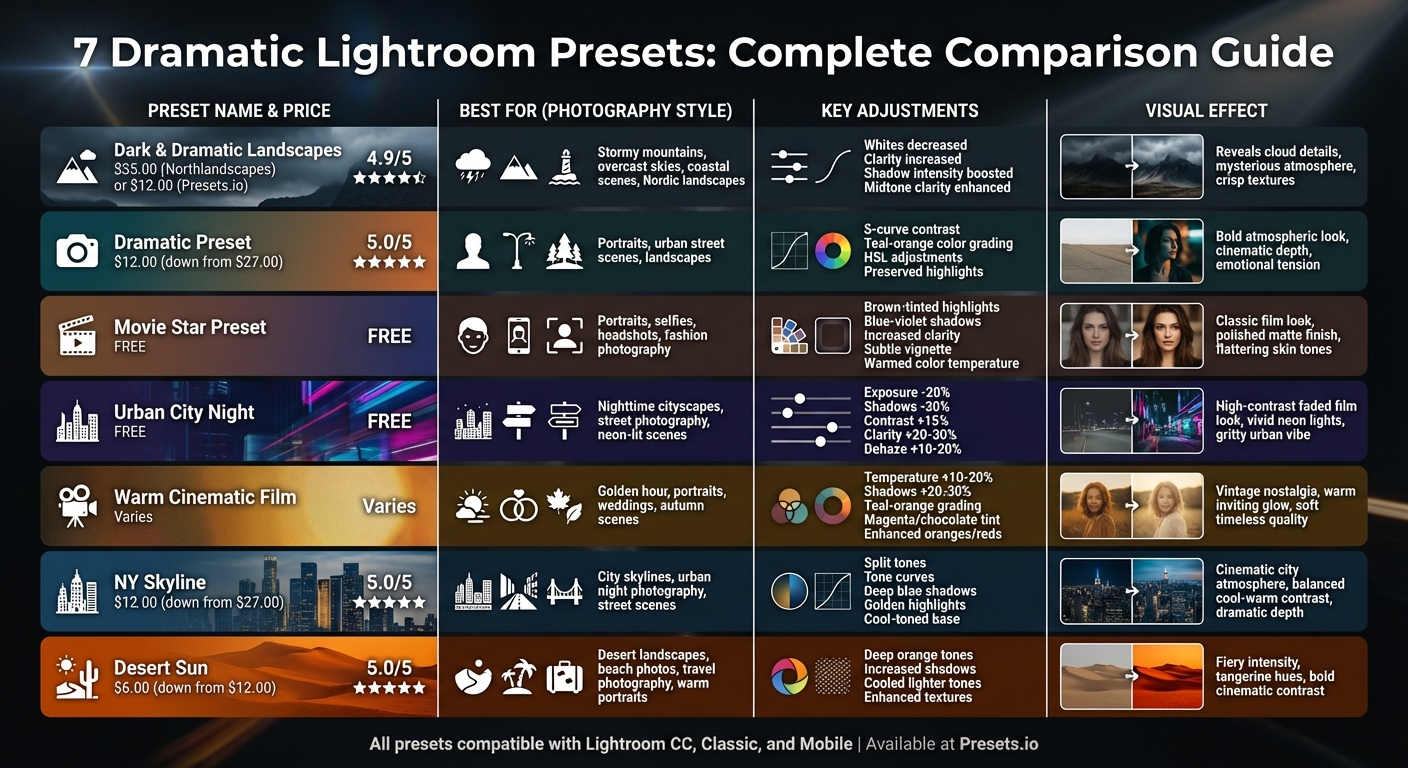 Image Caption
Lightroom Dramatic Presets Comparison: Effects and Best Use Cases
Preset transformations can dramatically change the mood and tone of a photo. For example, Dark & Moody presets reduce exposure by 30% to 50% and increase contrast by 30% to 40%, creating bold shadows and an intense atmosphere. Cinematic split-toning presets add depth by blending warm highlights (Hue around 50) with cool shadows (Hue around 220), while urban night presets sharpen clarity and adjust hues for a raw, gritty energy. Below is a table summarizing key adjustments and the effects of different presets, followed by additional notes explaining their transformations.
| Preset Type | Original Photo Best For | Adjustments | Result |
|---|---|---|---|
| Dark & Dramatic Landscapes | Stormy mountains, overcast skies, bright coasts | Whites decreased; Clarity increased; Shadow intensity boosted | Reveals cloud details and adds mysterious, crisp textures |
| Dramatic / "Twilighty" | Late afternoon, dusk, low-light outdoor shots | Greenish tint in highlights/sky; Contrast increased | Creates a cinematic, "Twilight" movie atmosphere |
| Urban City Night | Street photography, dim-lit scenes | Clarity increased by 20%–30%; Dehaze increased by 10%–20%; Enhanced shadows | Produces a gritty, dramatic look with strong contrast |
| Warm Cinematic Film | Golden hour, autumn scenes, portraits | Temperature increased by 10%–20%; Shadows increased by 20%–30%; Enhanced oranges/reds | Delivers a warm, inviting glow with lifted shadows |
The "Touch of Drama" preset is another standout option. It reduces white brightness to uncover hidden tones while keeping dark textures intact, adding depth and subtle intensity to photos.
Conclusion
Dramatic presets work wonders by dimming overly bright areas to uncover hidden details and enhancing darker regions to add a sense of depth. They also boost clarity to highlight textures, while smart contrast adjustments and thoughtful color grading evoke emotion without compromising image quality. These techniques are at the heart of what makes dramatic presets so impactful.
Aaron Nace, Founder of PHLEARN, puts it perfectly:
"A gritty and dramatic photo catches your eye and stands out from the crowd... our presets intelligently increase contrast, richen warmer shades, and mute colors while preserving skin tone".
Tools like vignetting and split toning help direct attention to your subject, while balancing warm and cool tones creates a cinematic feel. Slight tweaks to shadows can also retain texture, even in the darkest parts of an image. These presets offer a great starting point for editing, leaving room for your personal touches.
If you're ready to dive into these tools, Presets.io has over 40 trending collections that work seamlessly across mobile, tablet, and desktop. New collections are added weekly. Prices start at just $12.00, or you can unlock the entire library with the All Access Club membership for $14.99. Visit Presets.io to find dramatic presets that bring your creative ideas to life.
FAQs
How can I find the best Lightroom preset for my photography style?
To pick the right Lightroom preset, start by deciding the vibe or look you want for your photos - whether it’s cinematic, vintage, or something moodier. Make sure to choose presets that suit your photography style, like portraits or landscapes, and consider the lighting conditions you typically work with. Preview sample images to see how the presets transform photos and pick one that matches your creative vision.
After choosing a preset, test it on a few of your own photos to see if it complements your editing style. A good preset should speed up your workflow but still leave room for tweaks, like adjusting exposure or color tones. Also, double-check that it’s compatible with your Lightroom version and confirm the cost in U.S. dollars before buying. The right preset can take your photos to the next level, giving them a polished and cohesive look.
Can I use these presets on both the Lightroom mobile and desktop apps?
Yes, these presets work on both the desktop and mobile versions of Lightroom. Whether you're editing at your desk or on the move with your phone, you can easily apply them. Just install the presets on your chosen device, and you’re all set to transform your photos with dramatic edits in no time.
Does Presets.io offer any free Lightroom presets?
Currently, Presets.io focuses exclusively on offering paid bundles and collections of Lightroom presets. As of now, there’s no mention of free presets being available on the platform.
If you’re aiming to elevate your photo editing game, Presets.io has plenty to offer. Their selection includes a range of styles like cinematic, vintage, and dramatic, all crafted to help you achieve striking visual results effortlessly.