
Table of Contents
- Best Lightroom Presets for High Contrast Landscapes
- Creating a Vivid High Contrast Import Preset - Weekly Ordinary to Extraordinary Lightroom Edit - E15
- 1. Presets.io High Contrast Landscape Collection
- 2. Landscape View Preset
- 3. Wanderlust Preset
- 4. High Contrast Scene Preset
- 5. Classic Bright Preset
- 6. Bold and Vivid Preset
- 7. 300 High Contrast Bundle Preset
- 8. Moody High Contrast Preset
- 9. Skyfall Preset
- 10. Matte High Contrast Preset
- Comparison Table
- Conclusion
- FAQs
Best Lightroom Presets for High Contrast Landscapes
Looking to make your landscape photos pop with dramatic contrasts and rich textures? Lightroom presets can save time and elevate your edits with just one click. This guide highlights the top presets for high-contrast landscapes, perfect for rugged terrains, vibrant skies, and tricky lighting conditions. Here's a quick look at what you'll discover:
- Presets.ioHigh Contrast Landscape Collection: Balanced contrast and split-toning for dynamic scenes.
- Landscape View Preset: Subtle adjustments for natural tones and light.
- Wanderlust Preset: Vibrant, film-inspired colors for adventurous shots.
- High Contrast Scene Preset: Ideal for extreme lighting with deep shadow recovery.
- Classic Bright Preset: Bright, sunny edits for daytime landscapes.
- Bold and Vivid Preset: Intense saturation and vibrance for colorful scenes.
- 300 High Contrast Bundle: A free collection offering 300 diverse presets.
- Moody High Contrast Preset: Atmospheric tones for cloudy or overcast settings.
- Skyfall Preset: Dramatic effects for bold skies and rich textures.
- Matte High Contrast Preset: Film-like tones with soft blacks for textured landscapes.
These presets work seamlessly on Lightroom desktop and mobile Android devices, offering quick solutions for stunning edits. Whether you're editing sunrise shots, stormy weather, or golden hour moments, there's a preset here to match your style. Dive in to find the perfect tool for your high-contrast photography needs.
Creating a Vivid High Contrast Import Preset - Weekly Ordinary to Extraordinary Lightroom Edit - E15
sbb-itb-b27063b
1. Presets.io High Contrast Landscape Collection
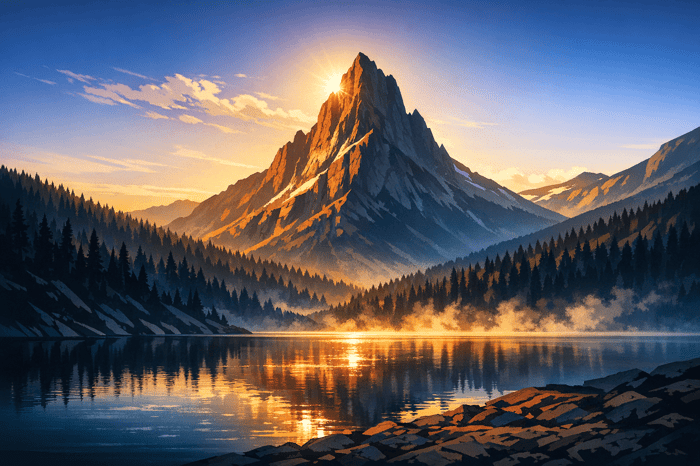
The Presets.io High Contrast Landscape Collection brings a signature "clean edit" style to your photos by reducing saturation and boosting contrast. It's designed for effortless use across platforms, including Lightroom Desktop (Classic and CC), Lightroom Mobile, and Adobe Camera Raw. The collection includes .XMP files for desktop and .DNG files for mobile, compatible with both iOS and Android devices. Let’s dive into how its unique color and tonal adjustments can elevate your images.
Color and Tonal Adjustments
This collection utilizes split-toning to create a striking effect: warm tones are added to highlights, while shadows take on a cooler blue hue. This method enhances the sense of depth and dimension in your photos. On top of that, the presets amplify vibrance, giving your images a polished, professional look.
Shadow and Highlight Refinements
The presets are crafted to adjust exposure with precision. By setting highlights to –100 and shadows to +100, they recover intricate details in both the brightest and darkest areas. Clarity adjustments, typically around +40, further enhance texture and definition. The result is a balanced interplay between blacks and whites, ensuring that every detail is highlighted for a dramatic, refined finish .
Ideal Scenarios for High Contrast Landscapes
These presets shine in situations with bold directional lighting, making them perfect for sunrise and sunset shots where vibrant skies meet darker landscapes. They’re also excellent for adding impact to colorful scenes, such as stormy weather or golden hour moments. The emphasis on contrast and clarity helps bring out the drama and intensity in these settings.
2. Landscape View Preset
The Landscape View Preset is designed with a "clean edit" approach, enhancing your photos while keeping them true to life. Instead of creating an exaggerated or artificial effect, it focuses on subtle adjustments that highlight natural light and color. By gently desaturating images and adding contrast, this preset achieves a polished and harmonious look. It enhances the scene without overshadowing its natural beauty.
Color and Tonal Adjustments
This preset uses split-toning to introduce warm highlights and cool shadows. But unlike more aggressive styles, it applies these adjustments with a light touch to maintain the scene's authenticity. The desaturation feature ensures colors stay realistic and don't veer into an over-processed appearance. This balance is especially crucial for outdoor photography, where the goal is to preserve the natural feel of the environment.
Shadow and Highlight Refinements
One of the standout features of this preset is its ability to recover details across the tonal range. It reduces highlights to avoid washed-out skies while lifting shadows to uncover details hidden in darker areas. This combination enhances the dynamic range, giving the image a more vivid and layered appearance. The adjustments are carefully calibrated to maintain natural tones, ensuring highlights remain recoverable and shadows feel balanced.
Ideal Scenarios for High-Contrast Landscapes
This preset shines in situations with dramatic lighting conditions. For example, it works wonders under harsh midday sunlight, where deep shadows and bright highlights coexist. It’s perfect for capturing complex details in scenes like rocky landscapes under direct sun or forested areas with scattered light. Whether it’s a mountain range with sharp contrasts or a coastal view with reflective surfaces, this preset brings out subtle details that might otherwise go unnoticed. Its natural and refined style makes it a versatile choice for photographers seeking a balanced yet striking landscape edit.
3. Wanderlust Preset
The Wanderlust Preset is crafted specifically for adventurous, high-contrast landscapes. It transforms these scenes with modern color palettes, offering dynamic combinations like orange and blue, red and teal, or "Earthy Greens." Whether you lean toward cooler or warmer tones, this preset delivers vibrant, HDR-like intensity with a nostalgic, film-inspired touch.
Color and Tonal Enhancement
This preset amplifies details with a +21 clarity boost and a +20 vibrance increase, making landscapes pop. It enhances natural elements such as ocean blues, desert sands, and golden wheat fields, all while preserving skin tones when people are part of the frame. The updated Wanderlust v2.0 takes it further by using AI to identify and enhance key landscape features automatically, saving you from tedious manual adjustments.
Shadow and Highlight Adjustments
To complement its vivid color enhancements, the preset tackles tonal extremes by reducing highlights (-36) and lifting shadows (+38). This adjustment brings out hidden details in both bright skies and dark foregrounds, ensuring balanced exposure across the frame. Advanced versions include AI-powered "Recover & Repair" tools that specifically address exposure challenges in skies and landscapes, making tricky lighting situations much easier to handle.
Best Use Cases for High-Contrast Landscapes
The Wanderlust Preset shines in environments with dramatic textures and lighting contrasts. It’s perfect for capturing mountain peaks, canyon depths, coastal waves, rugged rock formations, and expansive vistas. Even under harsh midday sun, it performs exceptionally well, making it a go-to choice for travel photography when waiting for perfect lighting isn’t an option.
Compatibility (Desktop/Mobile)
The Wanderlust collection works seamlessly across platforms, offering XMP files for Lightroom Classic and CC on desktop, and DNG files for the Lightroom mobile app. Whether you're editing at your desk or on the go, this preset ensures a smooth workflow.
4. High Contrast Scene Preset
The High Contrast Scene Preset is crafted for photographers tackling tricky lighting situations where stark contrasts between light and shadow dominate the scene. It works to preserve fine details in both the brightest highlights and the deepest shadows, making it a go-to option for creating striking and dramatic landscape images. This balanced approach lays the groundwork for further creative edits in high-contrast photography.
Color and Tonal Adjustments
This preset focuses on enhancing clarity and drama without overly altering colors. It brings out natural tones and adds depth by carefully adjusting contrast. This technique highlights textures in elements like rock formations, dramatic clouds, and rugged landscapes, all while keeping colors looking realistic and grounded.
Shadow and Highlight Balance
One of the standout features of the High Contrast Scene Preset is its ability to handle extreme lighting conditions. It tones down overly bright highlights, such as those in bright skies, while lifting shadows to bring out essential foreground details. After applying the preset, you can further refine the image by adjusting exposure, vignetting, grain, and noise reduction. For added precision, AI-powered sky masks can help create a balanced composition, ensuring the sky enhances rather than dominates the scene.
Ideal Scenarios for Use
This preset shines in dramatic natural settings, particularly in locations like Iceland, Scotland, or Romania, where rugged terrains meet dramatic skies. It’s especially effective during sunrise and sunset when the interplay of light and shadow is at its peak, as well as during Blue Hour and night photography. Autumn forests also benefit from the added contrast, with textures and foliage becoming more pronounced and vibrant.
Compatibility (Desktop/Mobile)
The High Contrast Scene Preset works seamlessly with Adobe Lightroom Classic, Lightroom CC, and Adobe Camera RAW (Photoshop). It supports both JPG and RAW file formats, offering flexibility for different camera setups. On desktops, it’s compatible with Lightroom versions 4, 5, 6, and CC. Mobile compatibility may vary depending on the specific preset collection you’re using.
5. Classic Bright Preset
The Classic Bright Preset offers a completely different vibe compared to moody or dramatic edits. It’s all about vibrant, sunny imagery that skips the dark tones. Photography expert Jenn Mishra sums it up perfectly: "Classic Bright... creates a bright, high-contrast scene that's full of color". This free preset from Presets.io enhances colors, making them pop while keeping the tones looking natural. Let’s break down what makes this preset stand out.
Color and Tonal Adjustments
To achieve its signature bright and lively look, this preset applies specific tweaks:
- Exposure: Increased by +0.50
- Contrast: Boosted by +21
- Vibrance: Raised by +20
- Saturation: Enhanced by +15
- Clarity: Elevated by +25
It also adjusts the white balance, tone curve, and HSL panels. Plus, it includes noise reduction and sharpening for a polished finish.
Shadows, Highlights, and Light Balance
Classic Bright shines when it comes to handling intense lighting. It reduces highlights by -50 to avoid washed-out skies while boosting shadows by +45, whites by +35, and blacks by +10 to retain detail. A subtle post-crop vignette helps balance the overall brightness. For images taken in bright conditions, watch for overexposed areas and tweak the exposure if necessary.
Ideal for Vibrant Landscapes
This preset is perfect for daytime landscapes drenched in sunlight. Think coastal views, alpine meadows, desert scenes - any setting where vivid colors and abundant natural light dominate. Unlike presets designed for moody atmospheres, Classic Bright offers a crisp, sunny alternative. It’s especially effective on photos with strong shadow detail, ensuring whites stay true and colors remain natural.
Compatibility for All Devices
The Classic Bright Preset integrates effortlessly into your workflow. It’s available as a free XMP file for both Lightroom desktop and mobile, making it easy to use wherever you edit.
The Seasons Bundle

$39.00
$135.00
The Seasonal Bundle brings together a versatile range of Lightroom presets inspired by the shifting tones and textures of the year — from cool, muted winter scenes to rich, golden autumn light. Inside, you’ll find collections like Winter, Gingerbread, Old… continue reading
6. Bold and Vivid Preset
The Bold and Vivid Preset takes color intensity to the next level, dialing up saturation and vibrance to create images that leap off the screen. It’s all about amplifying depth and highlighting nature’s raw beauty in a way that demands attention.
Color and Tonal Enhancement
This preset makes colors stand out by significantly boosting both vibrance and saturation. Vibrance adjustments typically range from +20 to +33, while saturation levels can climb as high as +48. It also makes heavy use of the HSL panel, tweaking specific tones like purples, reds, blues, and oranges to achieve maximum impact. The result? Landscapes transformed into vivid, eye-catching visuals with richly colored skies and foregrounds. This bold color treatment works hand-in-hand with fine-tuned shadow and highlight adjustments.
Shadow and Highlight Adjustments
Beyond the color enhancements, this preset also refines the interplay of light and texture. By carefully managing shadows and highlights, it ensures that even with intense color processing, details in both dark and bright areas remain intact. This balance prevents images from appearing overly processed or washed out, especially in high-contrast scenarios like dramatic skies or textured landscapes.
Best Use Cases for High Contrast Landscapes
The Bold and Vivid Preset shines brightest in landscapes bursting with color and contrast. Think autumn forests ablaze with reds and oranges, desert rock formations glowing under golden hour light, or coastal scenes with striking blue waters. It’s perfect for creating dramatic, attention-grabbing photos. However, it may feel overwhelming for more subdued or minimalist compositions, where a softer touch might be better suited.
Compatibility
As with most modern presets, the Bold and Vivid Preset is designed for seamless use across platforms. It works with Adobe Lightroom CC, Lightroom Classic, and Adobe Camera RAW in Photoshop . Many preset collections also include files optimized for Lightroom Mobile, allowing you to edit with consistent quality, whether you’re at your desk or on the go.
7. 300 High Contrast Bundle Preset
The 300 High Contrast Bundle is a treasure trove of creative possibilities, offering a collection of 300 presets designed to elevate high-contrast editing. Best of all, it's completely free, making professional-grade tools accessible to photographers at every level. This bundle from Presets.io caters to a variety of editing needs, ensuring there's something for everyone.
Color and Tonal Adjustments
This preset collection takes your images to the next level by desaturating colors while boosting contrast for a bold, polished look. The result? A clean, refined edit that mimics the clarity of in-camera adjustments. The bundle includes a range of tonal variations, such as Yellow Light, Green Shadows, Cold Shadows, and Purple Toning. Additionally, it features presets specifically crafted for landscape elements like Nature, Falls, Saturation, Sharpen, and Vintage, giving you precise control over color and tone.
Shadow and Highlight Effects
One standout feature is the split-toning effect, which adds warm highlights and cool blue shadows to your images. Variations like Soft Shadows, Green Shadows, and Cold Shadows offer customizable intensity, allowing you to fine-tune dark areas for added depth and drama. This is particularly useful for enhancing details in underexposed or dimly lit landscapes, resulting in a professional and dynamic finish.
Ideal Applications for High Contrast Landscapes
These presets shine in challenging lighting conditions, such as dimly lit scenes or areas with extreme contrasts, like autumn forests or overexposed skies. They're perfect for recovering details in flat or underexposed landscapes while maintaining a natural look. Beyond landscapes, this bundle is versatile enough for portrait, travel, wedding, and event photography, offering creative flexibility across different genres.
Compatibility
The 300 High Contrast Bundle is designed to work seamlessly across platforms, including Lightroom Mobile, Lightroom CC, and older desktop versions like Lightroom 4, 5, and 6. With both .lrtemplate and .xmp formats, it ensures compatibility with various software versions and supports both RAW and JPEG file types.
8. Moody High Contrast Preset
The Moody High Contrast Preset turns landscape photos into striking, atmospheric images. Instead of a quick, one-click fix, this preset collection offers a structured workflow with 15 base looks and 41 adjustment options, giving photographers more control over their edits.
Color and Tonal Adjustments
This preset uses split-toning techniques to create depth, focusing on colors like orange, teal, and green. Greens and blues are toned down, while yellows and oranges are amplified to bring out the warmth of golden hour lighting.
Shadows and Highlights
Highlights are softened, blacks are deepened, and shadows are slightly lifted to preserve fine details. As Skylum Blog explains:
"Moody and cinematic presets are not designed to fix light. They're designed to shape the atmosphere".
The shadows are cooled, and the highlights remain neutral, which enhances contrast and helps separate the subject from the background.
Ideal Scenarios for Use
These presets shine in landscapes featuring coastal, forest, or mountain scenes, especially under cloudy, foggy, or overcast conditions. They are particularly effective in regions like Norway, Iceland, and Greenland. Jan Erik Waider, creator of the Dark and Moody collection, notes:
"The presets unfold their full power in coastal, forest and mountain landscapes with clouds, fog or overcast skies".
They work best on photos with strong contrast, texture, or directional light, helping to shape the atmosphere rather than correcting poor lighting. This approach provides a cinematic edge, complementing other high-contrast styles found in comprehensive preset collections.
Compatibility
These presets are designed to work seamlessly across multiple platforms. They are compatible with Lightroom versions 4–6, CC, Classic, Mobile, and Adobe Camera Raw 10.3+ for Photoshop. Available in .XMP, .lrtemplate, and .DNG formats, they ensure flexibility for photographers using various tools.
9. Skyfall Preset
The Skyfall Preset is designed to bring out the drama in high-contrast landscapes, enhancing depth and enriching colors to showcase nature’s raw power. It intensifies skies and sharpens textures, giving your images a cinematic edge that grabs attention. Let’s break down how it works.
Color and Tonal Adjustments
This preset tweaks shadows, highlights, and clarity to make tones more striking. It enhances the natural contrast between the sky and the land, ensuring every element in your image gets its moment to shine. The result? Vibrant colors and dramatic effects that elevate your landscape photography.
Shadow and Highlight Refinements
Skyfall focuses on fine-tuning shadows and highlights to add depth and dimension. By preserving details in both bright and dark areas, it creates a perfect balance where dramatic skies seamlessly complement the foreground textures.
Ideal Scenarios for Use
This preset shines in landscapes with bold skies and rich textures. Think mountain ranges, coastal views with dynamic clouds, or any scene where nature’s contrasts take center stage. It’s especially effective in challenging lighting, helping you capture the raw beauty of the moment.
Compatibility
The Skyfall Preset works with JPEG and RAW formats and is supported across various platforms. You can install it through Lightroom's Develop Module or by dragging the files into the Develop Presets folder. For mobile photographers, it’s available in DNG format through the Adobe Lightroom app, compatible with both iOS and Android devices.
10. Matte High Contrast Preset
The Matte High Contrast Preset offers a fresh take on landscape photography by dialing down saturation while boosting contrast, resulting in a film-inspired look. Instead of focusing on vibrant colors, this preset emphasizes texture and detail, giving your photos a polished and subtle appearance. It aligns with Presets.io's goal of providing versatile tools for photographers with varied creative styles.
Color and Tonal Adjustments
This preset takes a refined approach to color and tone. Using split toning, it adds warmth to highlights and cool blue tones to shadows, enhancing the matte effect. By reducing saturation, the preset ensures colors don’t overpower the scene, while the increased contrast highlights every detail. It’s particularly useful for reviving flat or dull photos, turning them into striking images with depth and visual interest.
Shadow and Highlight Tweaks
The preset softens the darkest areas, converting deep blacks into gentle dark grays to achieve the signature matte effect. This technique delivers a film-like quality that feels less severe than traditional high-contrast edits. If highlights appear too dark, you can adjust the exposure slider upward. Similarly, lifting the shadows slider helps recover finer textures in your image.
Ideal Scenarios for Use
These Lightroom presets is perfect for overcast weather, rainy scenes, or textured landscapes like rocky terrain, concrete structures, or rugged natural settings. It’s designed to create a moody, cinematic vibe without making the image look overly processed. The matte effect works best on photos with existing directional light or strong textures, enhancing their natural atmosphere rather than fabricating one. Think vintage travel shots or aged film styles that bring character to mountain ranges, coastal cliffs, or even urban backdrops.
Compatibility
Like the other Lightroom presets in this collection, the Matte High Contrast Preset is compatible with Lightroom 4, 5, 6, CC, and Lightroom Mobile. It comes in both .lrtemplate and .xmp formats, making it easy to use with JPEG and RAW files on desktop or mobile. You can install it via the Develop Module on desktop or sync it through Lightroom CC to access it on iOS and Android devices seamlessly.
Comparison Table
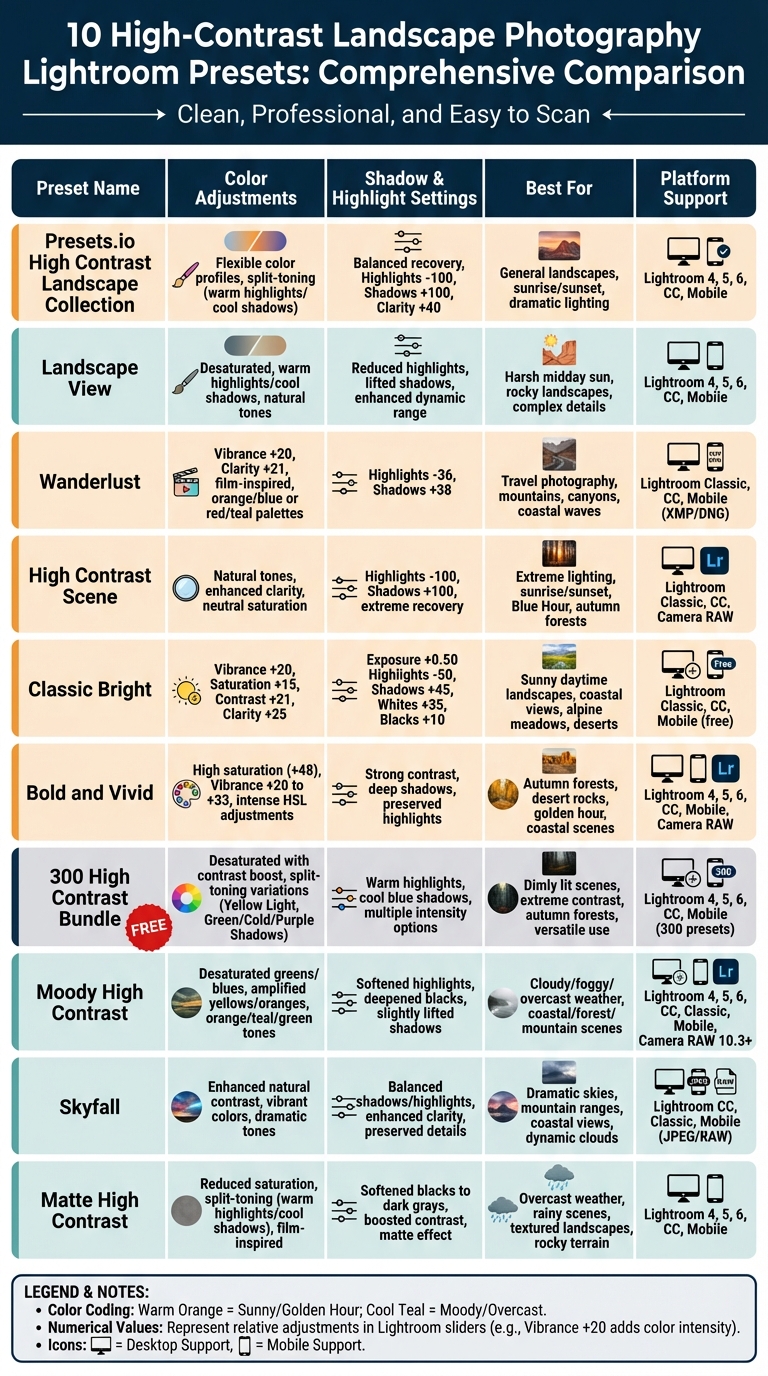
Lightroom High Contrast Landscape Presets Comparison Chart
Choose the Lightroom presets that matches your editing needs and the type of landscape you're working with. Below is a breakdown of Lightroom presets, including its color adjustments, shadow and highlight settings, ideal use cases, and platform compatibility.
| Preset Name | Color Adjustments | Shadow & Highlight Handling | Recommended Use Case | Platform Compatibility |
|---|---|---|---|---|
| Presets.io High Contrast Landscape Collection | Offers flexible color profiles for different moods | Balanced recovery across the dynamic range | Suitable for general landscapes in any lighting | Lightroom 4, 5, 6, CC, Mobile |
| Landscape View | Neutral tones with improved clarity | Moderate shadow lift and reduced highlights | Ideal for daytime landscapes with balanced light | Lightroom 4, 5, 6, CC, Mobile |
| Wanderlust | Slight vibrance boost (+20) | Highlights -36, Shadows +38 | Great for general landscapes; enhances clarity | Lightroom Classic, CC |
| High Contrast Scene | Maintains neutral saturation and vibrance | Highlights -100, Shadows +100 | Designed for recovering extreme dynamic ranges | Lightroom Classic, CC |
| Classic Bright | Vibrance +20, Saturation +15 | Highlights -50, Shadows +45, Exposure +0.50 | Perfect for bright, sunny days; mimics a sunny atmosphere | Lightroom Classic, CC |
| Bold and Vivid | Boosts saturation and vibrance for bold colors | Strong contrast with deep shadows | Best for colorful outdoor scenes and vibrant landscapes | Lightroom 4, 5, 6, CC, Mobile |
| 300 High Contrast Bundle | Warm highlights and cool shadows using split toning | Varies across 300+ Lightroom presets | Covers multiple scenarios with an extensive variety | Lightroom 4, 5, 6, CC, Mobile |
| Moody High Contrast | Desaturated with cool tones | Deep shadows for a dramatic look | Works well with stormy skies and dramatic weather | Lightroom 4, 5, 6, CC, Mobile |
| Skyfall | Enhances blues and cool tones | Focuses on recovering sky highlights | Perfect for dramatic skies and cloudscapes | Lightroom 4, 5, 6, CC, Mobile |
| Matte High Contrast | Reduces saturation with warm/cool split toning | Softens blacks into dark grays | Best for overcast weather and textured landscapes | Lightroom 4, 5, 6, CC, Mobile |
Most Lightroom presets in the table are available in .xmp and .lrtemplate formats, ensuring they work seamlessly across desktop and mobile platforms. Among these, the 300 High Contrast Bundle is a standout, offering over 300 Lightroom presets for free, catering to a wide range of editing needs. For extreme detail recovery, Lightroom presets like High Contrast Scene push sliders to their limits (Highlights -100, Shadows +100).
When choosing Lightroom presets, consider the lighting conditions of your photo. For example, Classic Bright is ideal for sunny scenes, while Matte High Contrast excels in overcast settings. Adjust these Lightroom presets to fine-tune the final look based on your preferences.
Conclusion
High-contrast landscape Lightroom presets take the hassle out of complex photo adjustments, turning intricate edits into simple, one-click solutions. Instead of grappling with tone curves, HSL panels, and split toning across multiple sliders, these Lightroom presets handle the technical heavy lifting. This means you can spend more time focusing on your creative vision and less time on tedious corrections.
These Lightroom presets excel at bringing out hidden details in tricky lighting situations. By boosting contrast and lifting shadows, they uncover vibrant details that might otherwise be lost in the highlights or shadows. They also enhance the overall impact of your images by deepening blacks, sharpening clarity, and making colors more vibrant - achieving effects that can be tough to replicate manually.
Since no two images are the same, a bit of experimentation is key. Apply different Lightroom presets to the same photo to see how each one interprets the scene - whether it’s a bright midday landscape, a moody storm, or the soft hues of blue hour. Think of Lightroom presets as a professional starting point that might still need a few tweaks. As Jenn Mishra puts it:
"The results of these presets vary depending on your subject and lighting. Feel free to tweak them for a more personalized and scene-specific edit."
Once you've applied Lightroom presets, fine-tune the results by adjusting sliders like exposure, vibrance, or shadow recovery to match your vision for the image.
For those looking to enhance their editing workflow, Presets.io offers new Lightroom presets collections every week, tailored to different photography styles. With detailed installation guides, you can start using them quickly. Whether you're editing a single stunning landscape or aiming for a cohesive style across your portfolio, the right Lightroom presets save time while delivering polished, professional results.
FAQs
Which preset should I use for harsh midday light?
When dealing with harsh midday light, it's best to use a preset that tones down the intensity of bright highlights and manages high contrast. Black-and-white presets or high-contrast landscape presets work particularly well in these conditions. These options help balance the extreme lighting, giving your photos a more polished and dramatic look. Look for presets tailored for such challenging lighting to get the best results.
How do I tweak a preset so it matches my photo?
To make a preset work perfectly with your photo, start by applying it, then head over to Lightroom's Develop module for some fine-tuning. Use sliders to adjust exposure, contrast, highlights, and shadows until the image looks balanced. If the colors seem off, try tweaking vibrance and saturation. These small adjustments will help the preset match your photo’s unique lighting and color tones, giving it a polished and cohesive appearance.
Do these presets work on Lightroom Mobile with RAW files?
Yes, these presets work seamlessly with Lightroom Mobile and are compatible with RAW files. They’re tailored for post-processing, making them perfect for improving your photos while you're on the move.