

Table of Contents
- Lightroom vs. Photoshop for Fashion Branding
- Lightroom vs Photoshop Editing - Day 29
- Quick Comparison
- Lightroom for Brand Consistency, Speed, and Repeatable Color
- Photoshop for Retouching, Composites, and Branded Assets
- Lightroom vs. Photoshop: Best Uses for Fashion Branding
- Conclusion: The Right Editing Stack for a Fashion Brand
- FAQs
Lightroom vs. Photoshop for Fashion Branding
If you edit lots of fashion photos, use Lightroom(LR) first and Photoshop only where it matters most.
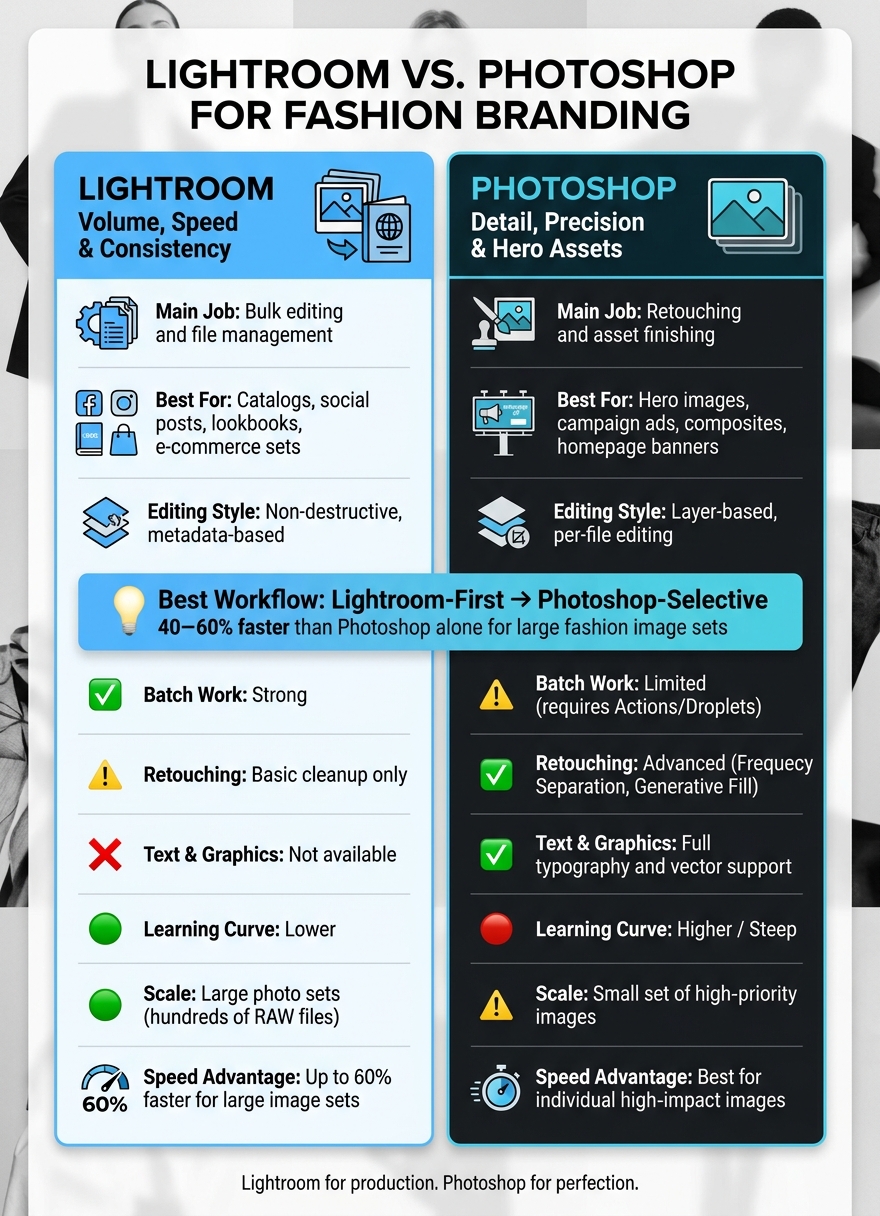
I’d sum it up like this: Lightroom is best for volume, color control, presets, file sorting, and batch edits. Photoshop is best for retouching, layers, text, composites, and hero assets. For large image sets, this mixed workflow can be 40% to 60% faster than using Photoshop alone.
Here’s the short version:
- Use Lightroom for e-commerce sets, social batches, lookbooks, and base color work
- Use Photoshop for homepage banners, print ads, campaign hero shots, and close detail cleanup
- Pick Lightroom when you need to edit hundreds of RAW files
- Pick Photoshop when you need pixel-level changes
- Use both if your brand needs steady color across channels and polished final assets
Lightroom vs. Photoshop for Fashion Branding: Quick Comparison Guide
Lightroom vs Photoshop Editing - Day 29
sbb-itb-b27063b
Quick Comparison
| Criteria | Lightroom | Photoshop |
|---|---|---|
| Main job | Bulk editing and file management | Retouching and asset finishing |
| Best for | Catalogs, social posts, lookbooks | Hero images, ads, composites |
| Editing style | Non-destructive, metadata-based | Layer-based, per-file editing |
| Batch work | Strong | Limited |
| Retouching | Basic cleanup | Deep retouching |
| Text and graphics | No | Yes |
| Learning curve | Lower | Higher |
| Scale | Large photo sets | Small set of high-priority images |
If I were building a fashion brand workflow, I’d keep it simple: set the look in LR, then send only the top images to Photoshop. That gives you steady output, cleaner production, and more control where people will notice it most.
Lightroom for Brand Consistency, Speed, and Repeatable Color
Catalogs, culling, and batch edits for fashion shoots
Lightroom is made for high-volume shoots. Its catalog system helps teams sort files by SKU, color, collection, or seasonal tags, so a messy drive becomes a searchable asset library.
Where LR saves the most time is batch processing. You can edit one image, sync those same settings across the rest of the shoot, and move through a 500-photo set in minutes with batch tools. In Photoshop, similar work can take hours. The edits are also non-destructive, which means LR stores changes as metadata instead of altering the RAW file itself.
LR's 2026 Assisted Culling adds another time-saving layer. It can flag the sharpest frames on its own and filter out technical misses like motion blur or missed focus. For a big runway or studio session, that cuts down the time a creative director spends digging through near-duplicates.
Once the base edit is set, presets help turn that look into a repeatable system.
Presets as a brand system
Presets are where LR starts doing more than production work. They help teams keep a steady visual look. A preset stores color, tone, and exposure settings as a one-click recipe. Use it across a campaign shoot, an e-commerce set, and a social content day, and the images carry the same visual DNA.
Building a core preset library takes some work at the start, but the payoff can be big. For teams shaping a reusable look, Presets.io offers LR starting points in aesthetic, cinematic, vintage, and film styles, along with installation guides. Those presets can act as a base, then get refined over time into something tied to the brand.
That steady look works well up to a point. Then the limits start to show.
Where Lightroom falls short
Lightroom is strong at global adjustments, but it doesn't go down to the pixel level. There are no layers, so you can't blend multiple images, swap backgrounds, or build composites. More advanced retouching, like frequency separation, isn't available here. The same goes for garment reshaping or cleanup that goes past simple spot removal.
It also doesn't include typography, vector, or layout tools. So if a campaign image needs a logo overlay, a text treatment, or a styled banner for paid ads, that part has to happen somewhere else. LR gets images to a polished, consistent starting point. Photoshop takes over from there.
The Ultimate Presets.IO Bundle
$89.00
$1,662.00
The Ultimate Presets.io Bundle combines The Master Preset Bundle Volume I and The Master Preset Bundle Volume II into one complete collection, giving you every editing style you need in a single download. Save $37 vs. Volume I and II… continue reading

Photoshop for Retouching, Composites, and Branded Assets
When an image becomes the brand’s hero asset, Photoshop takes over.
Pixel-level retouching for hero images
Photoshop handles the pixel-level fixes LR can’t. Retouchers use advanced skin retouching to smooth skin while keeping natural texture in place. Dodge and burn adds controlled light and shadow to a face or body. And for garments, editors zoom to 100% to clean up lint, stray threads, and dust on accessories - the kind of detail that shows up fast in print and tight crops.
That work takes time. So teams usually save it for hero images like a campaign poster, website banner, or lookbook cover. These are the shots that shape how people see the collection.
Layers, masks, and graphics for brand storytelling
Photoshop also helps teams build branded layouts. With layers, you can stack a model shot, background, color grade, logo, and headline in one file while keeping each part editable on its own. That’s how campaign posters, website banners, and lookbook covers come together. It’s also how a brand can bake its visual style into each asset.
Generative Expand lets editors extend a portrait’s canvas to fit a set layout - adding headspace for a headline or stretching the frame for a horizontal banner - without a reshoot. Typography tools also let designers sample colors from the garment or background so the text lines up with the rest of the asset.
"Photoshop is a composition tool. It is designed to take individual images and modify them at a pixel level - retouching, compositing, and creating visuals that require more than color and tone adjustments." - Joey Kamphuis, The Editing Studio
Why Photoshop slows down for large photo sets
Photoshop treats each image as its own file, so it doesn’t handle large sets the way LR does. Each shot becomes a manual job with its own layers, masks, and file setup. On top of that, layered PSDs get big fast.
That’s why Photoshop works best for a small set of hero images, not an entire fashion shoot. It’s the finishing step, not the starting point for large sets.
Lightroom vs. Photoshop: Best Uses for Fashion Branding
Which tool fits campaigns, catalogs, social feeds, and lookbooks
When you're dealing with a lot of images, LR is the better fit. When you need pixel-level control, Photoshop takes the lead.
For most e-commerce catalogs, social batches, and seasonal lookbooks, LR does the heavy lifting. Its batch workflow is built for speed, which makes it a smart pick for high-volume work where consistency matters.
Photoshop steps in when one image needs extra care. Campaign hero images are the best example. If a single frame is going to carry the brand message, Photoshop is usually worth the added time. A common setup is simple: use LR for file organization and global edits, then move only the top hero shots into Photoshop for retouching, compositing, or graphic work.
You can see this divide even more clearly when you look at where the images will end up. LR works well for social approvals, lookbook matching, and exposure fixes across product sets. Photoshop, on the other hand, doesn't handle repetitive, high-volume tasks as smoothly.
Use the table below to line up each tool with the right fashion asset.
Comparison table: Lightroom vs. Photoshop for fashion branding
| Feature | Lightroom | Photoshop |
|---|---|---|
| Workflow | Catalog-based, non-destructive, high-volume | Layer-based, manual per file |
| Batch Editing | Excellent - sync settings across hundreds of files | Limited - requires Actions or Droplets |
| Color Grading | Global and regional via HSL, presets, and profiles | Granular via Curves, Selective Color, and LUTs |
| Retouching Depth | Basic cleanup | Advanced - Frequency Separation, Generative Fill |
| Text & Graphics | None | Full typography and vector graphic support |
| File Management | Built in | External |
| Scalability | High - designed for thousands of images | Low - best for individual high-impact images |
| Learning Curve | Easier | Steep |
| Best Use in Fashion | E-commerce catalogs, social feeds, lookbooks | Campaign hero shots, branded ads, composites |
Conclusion: The Right Editing Stack for a Fashion Brand
Use a LR-first, Photoshop-selective workflow. LR is for production work. Photoshop is for detail work. Start with broad edits, then move into deeper retouching only on the images that need it.
When Lightroom alone is enough
If your team handles frequent product drops, a steady social content calendar, or fast-turnaround lookbooks, LR can do the whole job. Its batch editing tools and fashion LR presets help keep your brand look consistent across large image sets without touching every file one by one. For high-volume output, LR is usually enough.
When Photoshop is worth the extra time
Some assets need more care. That’s when it makes sense to switch tools. Close-up beauty shots and detailed fabric photography fit this group too - any image where people are likely to zoom in and inspect texture, skin, or stitching.
Use Photoshop for:
- Homepage banners
- Print ads
- Campaign hero images
A Lightroom-first, Photoshop-selective workflow is estimated to be 40–60% faster than Photoshop alone across large image sets.
FAQs
When should I use both Lightroom and Photoshop?
Use both when your workflow shifts from fast batch edits to detailed, pixel-level work.
Start in Lightroom to organize files, make global color corrections, and apply branded presets so everything has a consistent look.
Then move to Photoshop for more involved edits, like compositing, high-end skin retouching, adding text, or removing distractions. When you're done, save the file back to your Lightroom catalog.
Is Lightroom enough for most fashion brand images?
Often, yes. Lightroom is usually enough for most fashion brand images when the goal is fast batch editing, color correction, file organization, and a consistent look across a large set of photos. Presets can also help keep that branded style steady from one shoot to the next.
If you need pixel-level precision, advanced skin retouching, or complex compositing, Photoshop may still be necessary.
How do presets keep branding consistent?
Presets help keep branding consistent by giving your visuals a steady starting point.
When you apply the same pre-set adjustments - like color grading, exposure, and contrast - across a gallery or campaign, every image is more likely to share the same look and feel. That makes your brand easier to recognize. It also cuts down on guesswork and helps avoid mismatched results from one shoot to the next.