
Table of Contents
Lightroom Presets for Perfect Wildlife Exposure
Capturing wildlife photos with perfect exposure is tough. High-contrast scenes, uneven lighting, and constant animal movement create challenges like clipped highlights, dull shadows, or noisy images. Lightroom presets simplify this process by applying expert adjustments in one click, saving time and ensuring consistent results.
Here’s a quick look at five presets tailored for wildlife photography:
- Natural Warmth: Boosts exposure (+10%) and shadow details for radiant golden-hour shots.
- Dramatic Moody: Deepens shadows (+20%) and enhances contrast (+25%) for forest or cloudy scenes.
- Nighttime Recovery: Lifts exposure (+20%) and reduces noise (+25%) for low-light photos.
- Cinematic Wildlife: Adds a polished, movie-like look with subtle vignettes and cooler tones.
- Basic Wildlife Adjustment: A versatile starting point with balanced tweaks to improve any shot.
Why use presets? They streamline editing, handle tricky lighting, and help you maintain a polished style across your photos. Platforms like Presets.io offer extensive collections, including bundles like the Master Preset Bundle Volume II, to suit various needs. Whether you're a beginner or a pro, presets are an effective way to refine your wildlife photography workflow.
EXPOSING Lightroom Editing SECRETS For Wildlife Photography
sbb-itb-b27063b
Best Lightroom Presets for Wildlife Exposure
Wildlife photography often comes with its own set of challenges, particularly when it comes to lighting. This complete collection of Lightroom presets are designed to tackle those tricky scenarios and transform your wildlife shots into captivating images.
Natural Warmth Preset
Perfect for golden hour shots, this preset enhances exposure by 10% and contrast by 15%, making subjects stand out beautifully against warm, glowing backgrounds. It also increases shadow recovery by 10%, ensuring textures like fur and feathers retain their detail. The result? A cozy, radiant effect that breathes life into both animals and landscapes.
Dramatic Moody Preset
For those shadowy forests or cloudy days, this preset works wonders. It decreases exposure by 10% and highlights by 20%, while boosting contrast by 25% and deepening shadows by 20%. These adjustments create an atmospheric, dramatic effect, adding depth and preventing your photos from feeling flat in low-light conditions.
Nighttime Exposure Recovery Preset
Low-light wildlife shots can be tricky, but this preset helps by increasing exposure by 20% and recovering shadows by 30%. To keep your images clean and sharp, it also applies 25% noise reduction, making it ideal for capturing clear details even in the darkest environments.
Cinematic Wildlife Preset
This preset gives your wildlife photos a polished, cinematic appearance. It cools the temperature slightly, reduces highlights by 20%, underexposes by 5%, and boosts contrast by 20%. A subtle vignette effect of 10% frames your subject beautifully, adding a professional, movie-like touch.
Basic Wildlife Adjustment Preset
If you’re looking for a versatile starting point, this preset offers gentle tweaks: exposure is increased by 5%, contrast by 10%, highlights are reduced by 10%, and shadows are brightened by 10%. It’s a great baseline for refining your shots under various lighting conditions.
(All adjustments align with standard industry practices, ensuring reliable results for your wildlife photography.)
Preset Comparison Table: Exposure Settings
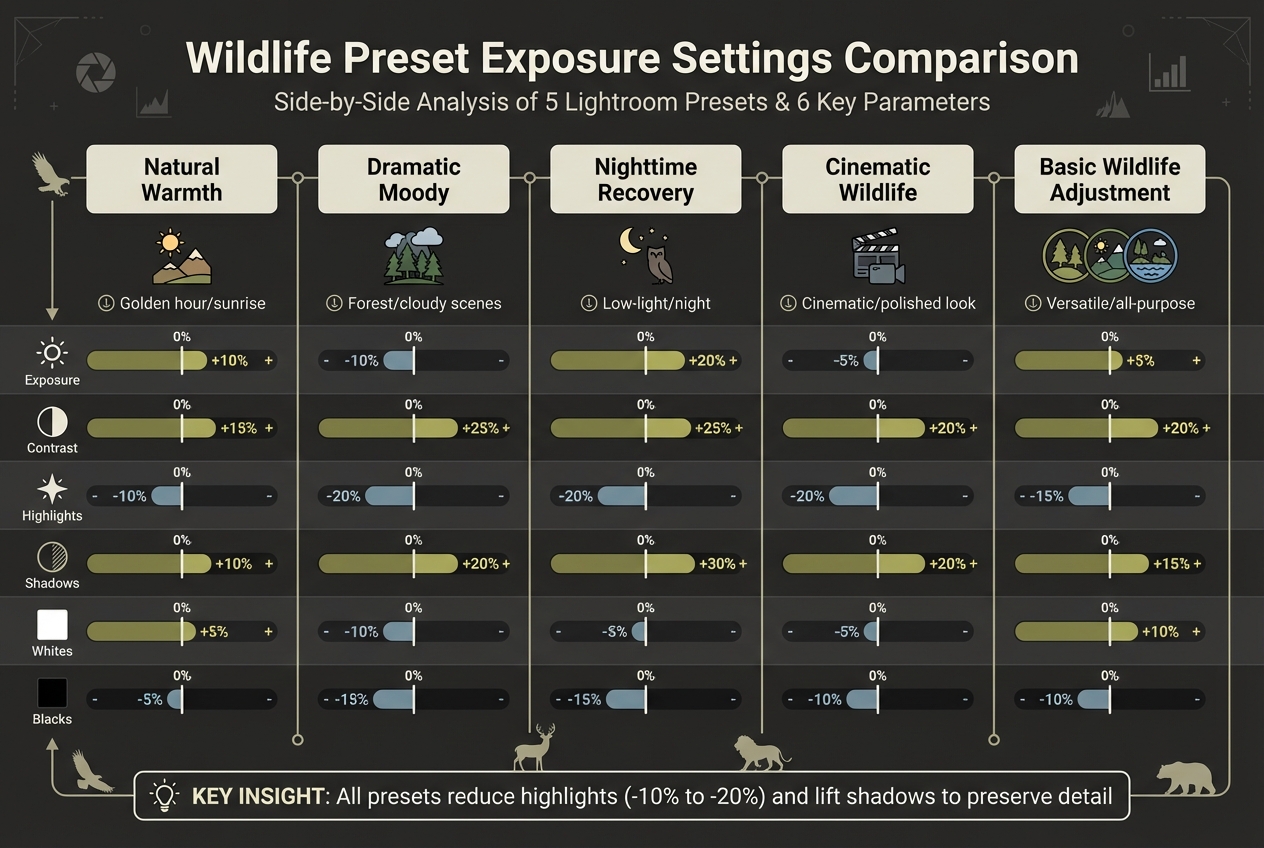
Lightroom Wildlife Preset Exposure Settings Comparison Chart
Here’s a quick look at how different presets handle exposure settings:
| Preset Name | Exposure | Contrast | Highlights | Shadows | Whites | Blacks |
|---|---|---|---|---|---|---|
| Natural Warmth | +10% | +15% | -10% | +10% | +5% | -5% |
| Dramatic Moody | -10% | +25% | -20% | +20% | -10% | -15% |
| Nighttime Recovery | +20% | +25% | -20% | +30% | -5% | -15% |
| Cinematic Wildlife | -5% | +20% | -20% | +20% | -5% | -10% |
| Basic Wildlife Adjustment | +5% | +20% | -15% | +15% | +10% | -10% |
Each preset has its own approach to balancing light and shadow, but they all share a few common traits. For instance, highlights are always reduced (ranging from -10% to -20%) to preserve bright details, while shadows are consistently lifted to recover details in darker areas. The Nighttime Recovery preset is especially aggressive here, with a +30% shadow boost for low-light conditions.
Contrast adjustments, typically between +15% and +25%, help subjects pop against their backgrounds. Meanwhile, tweaks to Whites and Blacks ensure depth and detail are maintained without overexposing or crushing tones.
Want more options? Check out Presets.io for a wider selection of exposure tools tailored to your specific needs.

The Master Preset Bundle: Volume II

$69.00
$990.00
The Master Preset Bundle Volume II New Looks. More Styles. Even More Creative Control. Get 66 brand-new Presets.io collections in one powerful Volume 2 bundle — crafted to expand your editing range, refresh your workflow, and deliver polished, professional results in… continue reading
Wildlife Presets on Presets.io
Presets.io has become a go-to resource for wildlife photographers looking to enhance their work with modern, adaptable edits. With over 60,000 photographers relying on the platform, it’s clear they’ve made a mark in the field of photo editing. Plus, they keep things fresh by releasing new presets every week to match the latest trends.
One standout offering is the Master Preset Bundle Volume II, which packs an impressive 687 presets spread across 66 collections. These include styles like Cinematic, Aesthetic, Kodak, and Vintage Film, all designed to bring out balanced exposure and rich, vibrant tones in your shots.
Presets.io goes the extra mile by ensuring compatibility across multiple formats. Whether you're editing on Desktop (XMP/LRTemplate), Mobile (DNG), or working with Video LUTs (CUBE), you can maintain a consistent look across both your photos and videos.
"Our presets are incredibly easy to use, even for beginners, so you can quickly edit your photos like a pro." - Presets.io
The platform boasts a stellar 4.8/5 rating from 1,425 reviews, with users frequently praising how quickly and dramatically their images are transformed. installation guides and Each purchase is backed by installation guides and customer support to make the process seamless. Individual preset collections are priced around $15.00 (regularly $27.00–$47.00), while the Master Bundle offers an incredible value at $67.00.
Conclusion
Lightroom presets can make a world of difference when dealing with tricky wildlife exposures. Instead of spending hours fine-tuning every detail, you can apply a preset and instantly bring out balanced tones and details. This time-saving tool is the backbone of the presets highlighted earlier. Not only do they speed up your editing process, but they also ensure consistent, polished results - especially when tackling challenges like deep forest shadows or harsh backlighting.
"Presets are a powerful tool for simplifying and enhancing your wildlife photography workflow... saving you countless hours of manual editing." - AAA Presets
Think of presets as a starting point. From there, you can tweak settings to fit each shot perfectly - adjusting exposure, lifting shadows, or toning down highlights to bring out every nuance. This method helps you maintain a cohesive style throughout your portfolio while still tailoring edits to each unique scene.
Trying out various preset styles - like Natural Warmth for those golden hour moments or Dramatic Moody for dense forest captures - can open up new creative possibilities. It’s also a fantastic way to refine your personal style. Professional wildlife photographer Ryan Wilkes shares, "Working with these presets is also a great way for you to learn to create your own style through working backwards and analyzing the techniques that I used to achieve my signature looks".
To explore these carefully curated collections, visit Presets.io. With new presets added every week and compatibility across both desktop and mobile platforms, you’ll have all the tools you need to elevate your wildlife photography efficiently and effectively.
FAQs
Which preset should I use for harsh backlighting?
For tricky backlighting situations, opt for presets that boost contrast and highlights while keeping shadows balanced. Presets tailored for high-contrast scenarios, like those found in Wildlife Presets or Wildlife Edits collections, work wonders. These are especially helpful for highlighting details in tough lighting conditions, whether you're capturing wildlife or landscapes.
Do Lightroom presets work on both desktop and mobile?
Yes, Lightroom presets work on both the desktop and mobile versions of the software. After installation, you can easily access and apply them on either platform to enhance your photos effortlessly.
Should I still tweak exposure after applying a preset?
Adjusting exposure after applying a preset is usually a smart move. While presets provide an excellent foundation, they can't account for the unique lighting and details of every photo. Fine-tuning the exposure allows you to refine the image, ensuring it matches your creative vision and achieves the right balance for the specific shot.