

Table of Contents
- Top 7 Presets for Boosting Instagram Likes
- Best Lightroom Presets for Instagram Grid!
- How Presets Affect Instagram Likes
- 1. Bright Minimal Lifestyle Preset
- 2. Warm Cinematic Portrait Preset
- 3. Vibrant Travel and Urban Preset
- 4. Soft Pastel Aesthetic Preset
- 5. Film Look and Vintage Preset
- 6. Moody Dark Tones Preset
- 7. Natural Skin Tone Influencer Preset
- Comparison Table
- Tips for Using Presets to Get More Likes
- Conclusion
- FAQs
Top 7 Presets for Boosting Instagram Likes
Instagram’s algorithm loves polished, visually appealing photos. Lightroom presets make it easy to edit your photos quickly and maintain a consistent aesthetic across your feed. Whether you prefer bright, minimal styles or moody, cinematic vibes, the right preset can help your posts stand out, even after Instagram’s compression.
Here’s a quick look at the 7 presets that can transform your feed:
- Bright Minimal Lifestyle Preset: Clean, radiant edits perfect for lifestyle and wedding photos.
- Warm Cinematic Portrait Preset: Adds depth with warm tones and controlled shadows for portraits and storytelling.
- Vibrant Travel and Urban Preset: High-contrast, bold colors ideal for cityscapes and travel shots.
- Soft Pastel Aesthetic Preset: Delivers dreamy, pastel tones for romantic or seasonal content.
- Film Look and Vintage Preset: Recreates nostalgic film vibes with grain and faded colors.
- Moody Dark Tones Preset: Dramatic contrasts for artistic and atmospheric photography.
- Natural Skin Tone Influencer Preset: Subtle, polished edits that keep skin tones natural.
Why it matters:
- Consistency boosts engagement: A unified feed can increase likes by up to 48%.
- Saves time: Presets cut editing time from 20 minutes to seconds.
- Handles compression: High-quality presets keep your photos sharp and vibrant on mobile.
To make the most of these presets, stick to 2–4 for your entire grid, batch edit for efficiency, and adjust for lighting conditions. Check out Presets.io for easy-to-use collections.
Best Lightroom Presets for Instagram Grid!
sbb-itb-b27063b
How Presets Affect Instagram Likes
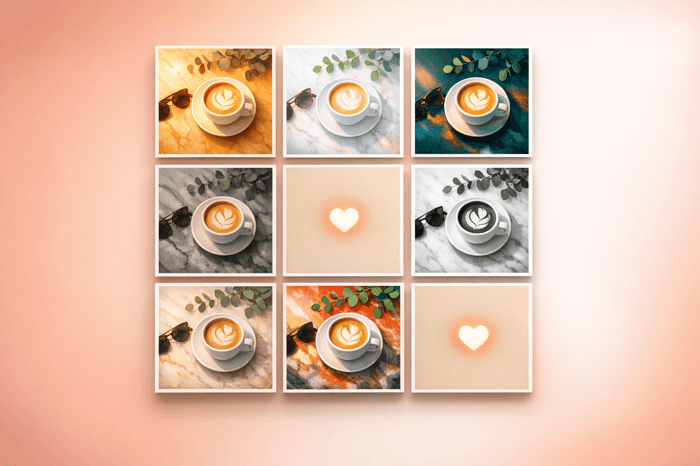
Let's face it: visually appealing photos get more likes on Instagram. The platform's algorithm rewards accounts that consistently post high-quality content. When your feed has a cohesive color palette and mood, it creates a polished, intentional look that grabs attention. This consistency not only appeals to viewers but also signals quality to Instagram's algorithm, making it more likely your posts will get noticed.
A unified grid also strengthens visual brand identity. When someone visits your profile and sees a consistent aesthetic, they're more likely to hit the follow button and engage with your content. Presets make this process easier by giving all your photos a consistent base, combining visual appeal with efficiency - a win-win for boosting engagement.
Here's another thing to consider: Instagram compresses every photo to 1,080px wide, which can dull colors and flatten subtle edits. High-quality presets are designed to handle this compression with balanced contrast and seamless color transitions, keeping your photos vibrant and sharp on mobile screens.
"A preset that looks perfect in Lightroom can look flat, harsh, or muddy after upload [due to compression]." - Joey Kamphuis, The Editing Studio
And let's not forget the time-saving factor. Editing a single photo from scratch can take 20 minutes or more. With a preset, it’s done in seconds. That extra time can be spent engaging with your audience, replying to comments, or posting more often - all of which help you reach more people and rack up more likes.
These benefits make presets a powerful tool for anyone looking to grow their Instagram presence.
1. Bright Minimal Lifestyle Preset
The Bright Minimal Lifestyle Preset brings elevated exposure, soft highlights, crisp whites, and subtle contrast to your images. It creates a clean, radiant look that feels polished but not overly edited - perfect for Instagram's visual-first audience.
This preset shines with lifestyle photography, influencer content, interiors, weddings, and outdoor scenes, especially during spring and summer when natural light enhances its effect. Whether you're capturing everyday moments, fashion, or small business visuals, this style blends seamlessly with your content.
A major perk? It holds up beautifully even after Instagram compresses your photos. Bright edits with controlled contrast and smooth highlight transitions fare much better than darker, heavily textured ones when resized for mobile screens.
"Bright edits compress better than dark ones. The soft highlight roll-off holds up well at smaller sizes." - Joey Kamphuis, The Editing Studio
This durability ensures your photos stay sharp and vibrant, even on smaller displays. To maintain a cohesive Instagram grid, take advantage of Lightroom's batch editing feature to apply the preset consistently. A visually unified feed can boost engagement by up to 48%, and this preset makes it simple to achieve that polished, professional look.
Up next, explore a preset that brings warm, cinematic depth to your photos.
2. Warm Cinematic Portrait Preset
This preset shifts away from the bright, minimal aesthetic and leans into a richer, more dramatic cinematic style. The Warm Cinematic Portrait Preset is all about deep shadows, warm midtones, and carefully balanced highlights, ensuring your images don’t look washed out. The result? A polished, film-like quality reminiscent of professional stocks like Portra, perfect for adding emotion and depth to your photos.
It’s a go-to choice for emotional portraits, golden hour shots, autumn landscapes, street photography, and candlelit wedding moments. Influencers also love it for maintaining a cohesive and luxurious look across their feeds.
This preset creates a moody cinematic vibe that naturally stands out in a sea of bright and airy edits. The key to its success lies in how shadows are handled - deep enough to add drama but controlled to avoid losing detail.
"When done right, moody edits are some of the most scroll-stopping content on the platform. The key is controlled shadows - not crushed blacks." - Joey Kamphuis, The Editing Studio
Pro Tip: After applying this preset, tweak the white balance. Cinematic tones are designed for specific lighting conditions, so images shot under tungsten light might look too orange without adjustment. Also, keep shadows detailed rather than completely blacked out to ensure your photos stay sharp, even on smaller screens.
For those wanting to try this style, the Cinestill Preset Collection on Presets.io is a great option. Priced at $15.00 (regularly ~$27.00), it includes 15 desktop and mobile presets and boasts a perfect 5.00/5-star rating from 10 reviews. Users frequently highlight its ability to deliver a "fabulous" filmic look that works beautifully for both portraits and landscapes.
3. Vibrant Travel and Urban Preset
The Vibrant Travel and Urban Preset brings bold contrast, rich blues and oranges, and sharp clarity to your photos, making city textures like building facades, street art, and neon reflections pop. Even after compression, your images will retain their sharpness and energy.
This preset is perfect for urban photography - think cityscapes, rooftop views, street shots, and lifestyle content. Whether you're capturing the iconic yellow taxis in New York City, the colorful Wynwood murals in Miami, or a sunset over the Chicago Riverwalk, this preset gives your visuals a striking look that naturally encourages saves and shares. A 2022 Tailwind survey of 1,000 Instagram users found that bright, high-contrast, colorful posts receive 24% more likes on average compared to muted, desaturated images in similar categories.
It’s especially effective for driving saves, one of Instagram’s top engagement metrics. Polished travel content often gets bookmarked for future trip planning. According to Sprout Social, content that’s "inspiring" and "helpful" tends to rank among the most-saved on Instagram. This preset also works wonders for Reels covers and carousel posts, giving your content a bold, recognizable edge on the Explore page. Hootsuite reports that carousel posts can generate up to 1.4–2x more engagement than single-image posts, making this preset a great choice for multi-image city stories.
The City Scape Preset Collection is available on Presets.io for $15.00 (regularly ~$27.00). Designed to highlight the vibrancy of urban life, it boasts a 5/5-star rating from 12 reviews. Verified buyer Tyler W. shared: "Every preset from you and yours have been nothing but great 😎".
Pro Tip: After applying the preset, check skin tones and blues. Adjusting the HSL sliders - reducing orange saturation slightly and shifting the blue hue toward neutral - can help maintain a polished, natural look.
4. Soft Pastel Aesthetic Preset
If the Vibrant Travel and Urban Preset is all about bold energy, the Soft Pastel Aesthetic Preset leans into a softer, dreamier vibe. With its lifted exposure, gentle highlights, and crisp whites, this preset delivers a polished yet natural feel that works effortlessly for lifestyle, portrait, and event photography. It’s perfect for curating a cohesive and visually pleasing feed.
This preset shines in various settings, including baby photos, couple sessions, weddings, minimalist interiors, and spring or summer-themed shoots. Its warm pink and peach tones create a romantic charm that draws viewers in. Sarina Schwefer shared her thoughts:
"I am in love with these beautiful presets. They add magic to every picture with a gorgeous pink finish."
Designed to produce bright and airy edits, this preset ensures that your photos maintain their soft, delicate tones - even after compression - so they look stunning at 1,080px on Instagram.
You can grab the Soft & Pink Preset Collection on Presets.io for $15.00, which includes 8 presets for both desktop and mobile. If you're on iOS, here is how to import presets to Lightroom on iPhone. For those looking for more options, The Aesthetic Bundle offers 180 presets and LUTs, earning a 5/5-star rating from 17 reviews. To keep your photos looking natural under different lighting conditions, tweak the white balance after applying the preset.
5. Film Look and Vintage Preset
Film-inspired aesthetics never go out of style on Instagram. This preset recreates the charm of classic film photography with warm tones, softened shadows, faded colors, and a touch of grain. It brings a nostalgic vibe that’s often missing in standard digital edits.
What makes film and vintage presets stand out is their ability to balance contrast and natural colors, even with Instagram’s compression. They create "matte" blacks, delicate highlights, and a warm glow that mimics the feel of printed photographs. This nostalgic look not only adds a personal touch but also helps craft a visually engaging feed that tends to draw more likes and attention.
This preset shines when used for lifestyle, fashion, street photography, or any content with a nostalgic theme. Users have also praised its flexibility, applying it to a variety of subjects like pets, nature, and landscapes - all while maintaining a cohesive aesthetic across their feeds.
Here’s what Emersyn Love, a verified buyer, had to say about it:
"I've been looking for what seems like ages for a preset/filter that would give my photos the authentic vintage/disposable look and I finally found it!"
Presets.io offers a range of film-inspired collections to explore, including the 35MM Preset Collection (rated 5/5 stars from 22 reviews), the Analogue Preset Collection, and the Instax/Disposable Pack. Each is priced at $15.00 (regularly $27.00) and comes in XMP, DNG, and CUBE formats. This ensures they work seamlessly with Lightroom on desktop and mobile, including Lightroom for Android, as well as video editing software like Premiere Pro. These presets don’t just elevate your photos - they help your feed stand out with a distinct, memorable style.
Next up, learn how moody dark tones can add even more variety to your Instagram grid.
Presets.io Luminar Neo Essentials Bundle

$139.50
$269.00
Presets.io Luminar Neo Essentials Bundle Take your photo editing to the next level with the Presets.io Luminar Neo Essentials Bundle—our complete editing solution built exclusively for Luminar Neo users. This exclusive bundle combines Luminar Neo Perpetual Desktop Software with 10… continue reading
6. Moody Dark Tones Preset
Moody dark tones bring an intense and dramatic flair to your photos. These presets emphasize deep shadows, strong contrasts, and muted or warm hues, giving images a cinematic and atmospheric vibe. They’re perfect for creating a striking visual impact while maintaining a consistent aesthetic that can help strengthen your brand identity.
This style works beautifully for urban portraits, street photography, lifestyle imagery, and seasonal Fall or Winter content. It’s especially effective for evoking a sense of moodiness and depth, making your photos stand out in a sea of lighter, airier edits.
Photographers and users like Alyssa and Margaret M. have praised these presets for their ability to unify a photo feed without sacrificing image clarity:
"These presets were a staple in my Fall and Winter insta feed! They were dark without making the photos hard to see. Love it."
"I honestly have practically built my photography business on this preset pack. It's INCREDIBLE!"
If you’re ready to dive into this style, Presets.io offers several highly-rated options: Deep Moody (5/5 stars, 8 reviews, $15.00), Dark Academia (5/5 stars, 12 reviews, $15.00), and Moody x Dark II (4.7/5 stars, 38 reviews, $24.00). Available in XMP and DNG formats, these collections can be easily adjusted - just tweak the exposure or contrast if the effect feels too intense for a particular shot. This flexibility ensures you can achieve the perfect balance without losing that signature moody vibe.
7. Natural Skin Tone Influencer Preset
If the moody dark aesthetic represents one extreme, the Natural Skin Tone Influencer Preset sits comfortably on the other side - delivering a subtle, polished look without feeling over-edited.
This preset is incredibly versatile, making it a great fit for various types of content, including lifestyle shots, travel images, everyday moments, and portraits. Its clean, neutral tones and slightly lifted blacks are designed to preserve natural-looking skin tones, which is a huge plus for creators in fashion and beauty. By refining contrast and toning down distracting hues, it keeps the subject front and center.
"It's all about showcasing your work in the most honest and elevated way." - Presets.io Team
One of the standout features of this preset is how it enhances feed consistency. Thanks to its balanced tones, it delivers cohesive results whether you're shooting indoors, outdoors, or in different lighting conditions. This makes it easier to maintain a unified and professional-looking grid no matter where or what you're shooting.
For batch editing, start by applying the preset to one image, fine-tune it, and then copy those settings across the rest of your photos. Export at 1080px in sRGB with a quality setting of 80–85 to ensure smooth color transitions, even after Instagram's compression. This simple step can make a big difference in keeping your feed polished.
To achieve this effortless look, check out these collections on Presets.io: the No Filter Preset Collection (15 desktop & mobile presets, $15.00) or the Natural Preset Collection (12 desktop & mobile presets, $15.00). Both collections deliver a clean and airy aesthetic, perfect for everything from couples and family portraits to solo lifestyle shots.
Comparison Table
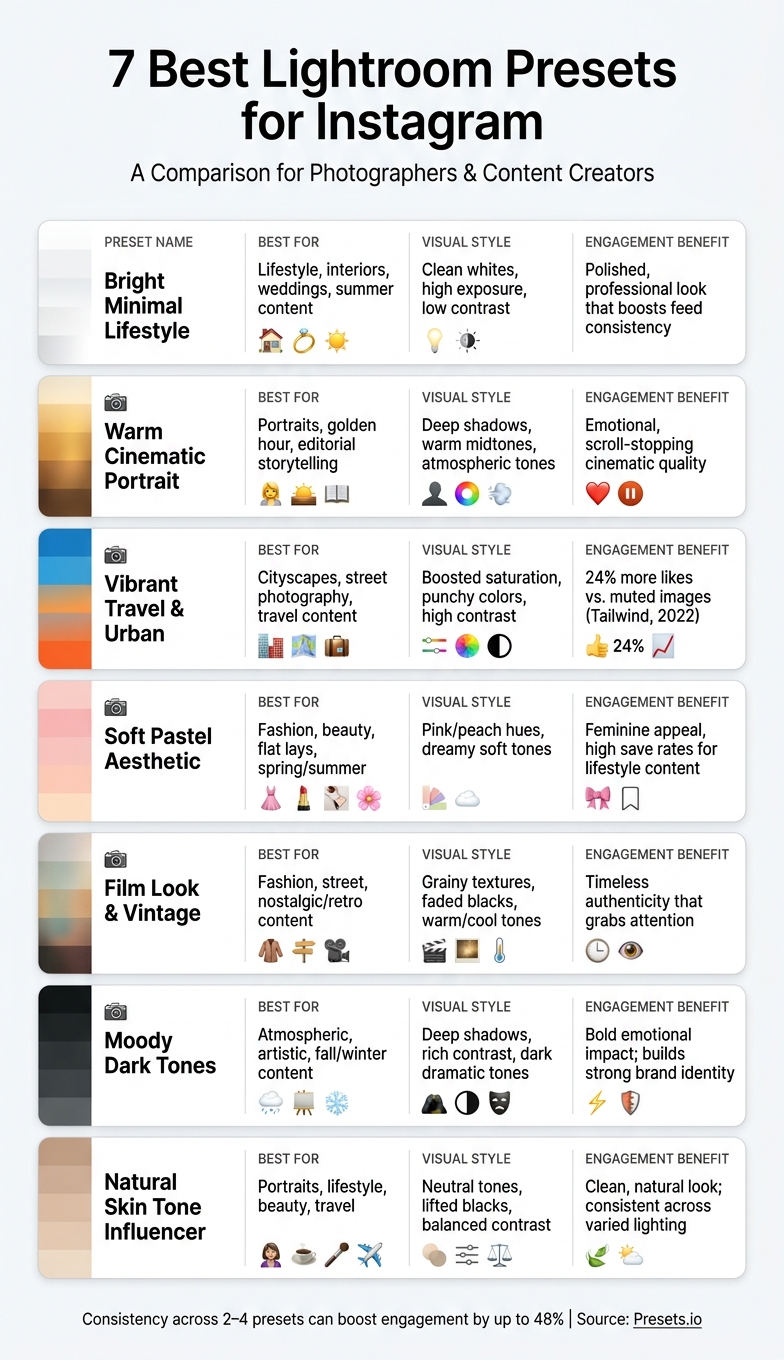
7 Best Lightroom Presets for Instagram: Side-by-Side Comparison
Here's a handy table to help you quickly compare the strengths, visuals, and best uses for each preset:
| Preset | Best Content Types | Visual Characteristics | Engagement Perks | Ideal Use Cases |
|---|---|---|---|---|
| Bright Minimal Lifestyle | Interiors, summer lifestyle, everyday shots | Clean whites, low contrast, high exposure | Professional and polished look | Influencers, lifestyle bloggers, wedding photographers |
| Warm Cinematic Portrait | Portraits, storytelling, editorial | Deep shadows, warm midtones, atmospheric tones | Emotional and attention-grabbing | Perfect for creators aiming for a cinematic or "brown aesthetic" feed |
| Vibrant Travel and Urban | Travel, street photography, cityscapes | Boosted saturation, punchy colors, high contrast | Visually striking with high energy | Travel enthusiasts and urban photographers |
| Soft Pastel Aesthetic | Fashion, beauty, food, flat lays | Pink/peach hues with soft, dreamy vibes | Feminine appeal and a "magical" feel | Ideal for spring/summer feeds and influencer content |
| Film Look and Vintage | Fashion, street, nostalgic content | Grainy textures, faded blacks, warm/cool tones | Timeless and authentic; grabs attention | Great for retro-themed or documentary-style photography |
| Moody Dark Tones | Atmospheric, artistic, dramatic shots | Deep shadows, rich contrast, dark tones | Bold and emotionally impactful | For creators seeking a consistent, dramatic aesthetic |
| Natural Skin Tone Influencer | Portraits, lifestyle, travel, everyday moments | Neutral tones, lifted blacks, balanced contrast | Clean and natural without looking over-edited | Ideal for fashion, beauty, and lifestyle creators working in varied lighting |
Key Takeaways
- Bright, airy edits tend to retain detail better on mobile devices, as mobile compression favors clean, high-exposure images.
- Warmer and more vibrant edits, like those from the Warm Cinematic Portrait or Vibrant Travel and Urban presets, often perform better on Instagram, especially when raw engagement is the goal.
- For creators handling large batches of photos, preset collections can streamline the editing process, ensuring consistency across different lighting scenarios while minimizing manual adjustments.
Tips for Using Presets to Get More Likes
Consistency is the secret to a cohesive Instagram feed. Many top photographers and influencers stick to just 2–4 presets for their entire grid. While individual photos might look amazing with different presets, mixing too many can result in a feed that feels disconnected and harder for followers to engage with.
"A preset alone doesn't guarantee a consistent feed... mixing presets from different packs creates mismatched tones even if each individual photo looks good." - Joey Kamphuis, The Editing Studio
Keeping your edits uniform also makes batch editing more efficient and helps you track what works best visually.
Batch editing is a huge time-saver. When using Lightroom presets, start by fine-tuning one photo, then apply those settings across a series of images. Adjust white balance and exposure individually to account for varying light conditions, but let the preset do most of the heavy lifting.
Leverage Instagram Insights to guide your editing strategy. Pay close attention to the Saves metric - it’s a strong indicator that your photo grabbed attention. For example, you can compare similar posts, like two travel shots - one edited with the Vibrant Travel preset and the other with the Film Look preset. After 48–72 hours, review reach and engagement stats. Over time, this comparison will show which styles resonate most with your audience.
Avoid over-processing your photos. Heavy grain, blown-out highlights, or extreme color shifts can look messy, especially after Instagram's compression. To maintain quality, export your images at 1,080px in sRGB color space with 80–85 quality settings. If you're editing on mobile, platforms like Presets.io provide step-by-step guides for installing presets and release new options weekly, helping you stay updated without overcomplicating your workflow.
Conclusion
The right Lightroom preset can completely transform how your Instagram feed is perceived. Consistency in visuals is often seen as the "golden rule" for Instagram growth, making it easier for creators to build a memorable and recognizable aesthetic that keeps followers coming back.
Each preset mentioned here is designed to evoke a specific mood or cater to a particular niche. The trick is to try out one or two presets that match your content style and stick with the ones your audience connects with most. For a cohesive look, start with presets from the same pack, and use Instagram Insights to track which edits lead to more saves and engagement. This strategy not only enhances your likes but also strengthens your overall visual identity.
Ready to dive in? Check out Presets.io for fresh presets and easy-to-follow installation guides updated weekly.
FAQs
Which preset should I start with for my niche?
To select the ideal preset for your niche, think about your brand’s visual identity - factors like your color palette, lighting preferences, and overall vibe. If you're just starting out, the Natural Preset offers balanced and understated edits, making it a solid choice. For those seeking flexibility across different types of photography - like portraits, urban scenes, or lifestyle shots - the Must-Have Presets Collection works well as an all-purpose option. Check out these styles and more at Presets.io to discover the perfect fit for your content.
How do I keep presets looking good after Instagram compression?
To keep your photos looking sharp and professional after Instagram compression, stick to presets that emphasize controlled contrast, natural tones, and subtle grain. Instagram's compression often dulls soft grain and smooth color transitions, so steer clear of oversaturated colors or dramatic tonal shifts. Make sure your export settings align with Instagram's recommended dimensions for optimal results. For this, Presets.io offers Lightroom and mobile presets crafted to maintain a polished appearance that stands out on social media.
Do presets actually increase likes or just make photos look better?
Presets are a fantastic tool for elevating your photos, giving them a polished and professional appearance that can make your content more visually appealing. While using presets alone won’t automatically boost your likes, high-quality, eye-catching images can grab attention, reinforce your brand identity, and build trust with your audience - essential ingredients for growing engagement over time. With Presets.io, you can access top-tier presets to achieve these results with ease.