

Table of Contents
- Image Format Converter
- Supported Image Formats
- Why Use an Image Format Converter?
- Choosing the Right Image Format
- When Should You Convert an Image?
- Image Format Comparison
- How to Convert an Image
- Tips for the Best Image Conversions
- Benefits of an Online Image Converter
- Why Choose This Image Converter?
- Best Practices for Image Conversion
- FAQs
Image Format Converter
Looking for a fast online image converter? Our Image Format Converter lets you convert PNG, JPG, JPEG, WEBP, and GIF images quickly and easily. Simply upload your image (up to 10MB), select the output format, customize optional settings, and download your converted file in seconds—all without installing software.
No software installation is required, making it an easy solution for everyday image conversion.
Supported Image Formats
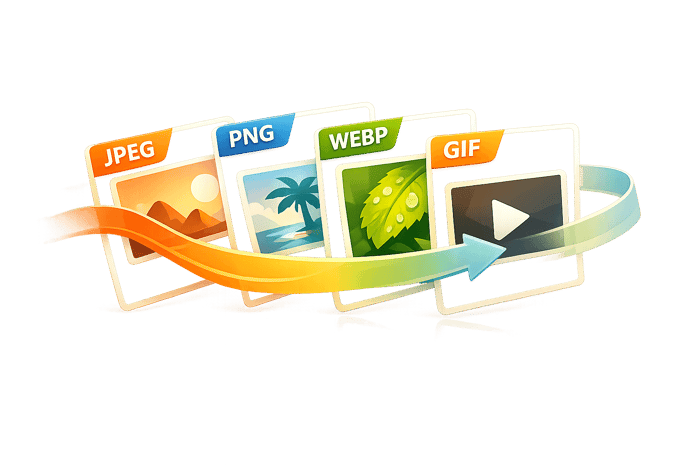
This converter supports the most common image formats used for websites, social media, design, and everyday sharing.
| Format | Best For | Transparency | Typical File Size |
|---|---|---|---|
| JPEG (JPG) | Photographs and digital images | No | Small |
| PNG | Logos, graphics, screenshots | Yes | Medium to Large |
| WEBP | Modern websites and web optimization | Yes | Small |
| GIF | Simple graphics and basic animations | Limited | Small to Medium |
Why Use an Image Format Converter?
Different image formats are designed for different purposes. Converting to the right format helps improve compatibility, reduce file sizes, and preserve image quality depending on how the image will be used.
Some of the most common reasons people convert images include:
Reducing file sizes for faster website loading.
Meeting upload requirements for websites and social media.
Preserving transparent backgrounds for logos and graphics.
Optimizing images for email attachments.
Preparing assets for presentations or design projects.
Making images compatible with older software or devices.
Whether you're a photographer, graphic designer, student, business owner, or casual user, converting images ensures your files work exactly where you need them.
Choosing the Right Image Format
JPEG
JPEG is one of the most widely used image formats and is ideal for photographs.
Best for:
Photos
Product images
Blog posts
Social media
Email attachments
Advantages
Small file sizes
Excellent compatibility
Fast loading
Limitations
Does not support transparency
Uses lossy compression, which can reduce quality after repeated editing
PNG
PNG is designed for graphics that require sharp details or transparent backgrounds.
Best for:
Logos
Icons
Screenshots
Infographics
Transparent graphics
Advantages
Lossless image quality
Transparency support
Crisp edges and text
Limitations
Larger file sizes than JPEG
WEBP
WEBP is a modern image format developed for the web.
Best for:
Websites
Online stores
Blogs
Landing pages
Advantages
Excellent compression
Smaller files than JPEG and PNG in many cases
Supports transparency
High visual quality
Limitations
Some older software may not fully support WEBP
GIF
GIF remains popular for simple graphics and lightweight animations.
Best for:
Basic animations
Memes
Small graphics
Decorative website elements
Advantages
Animation support
Broad compatibility
Limitations
Limited color palette
Not recommended for photographs
When Should You Convert an Image?
Image conversion is useful in many everyday situations. Different websites, devices, and applications often require specific image formats, making conversion an easy way to improve compatibility and performance.
You might want to convert an image when:
Preparing images for a website.
Uploading photos to social media.
Sending images through email.
Creating transparent graphics.
Optimizing an online store.
Sharing files across different operating systems.
Meeting upload requirements for online forms or marketplaces.
Converting an image only takes a few seconds but can significantly improve loading speed, compatibility, and usability.
Image Format Comparison
| Feature | JPEG | PNG | WEBP | GIF |
|---|---|---|---|---|
| Best for photographs | ✔ | ○ | ✔ | ✖ |
| Transparency | ✖ | ✔ | ✔ | Limited |
| Animation | ✖ | ✖ | Limited | ✔ |
| Small file sizes | ✔ | ○ | ✔✔ | ○ |
| Best for websites | ✔ | ✔ | ✔✔ | ○ |
The Adventure Bundle

$39.00
$105.00
The Adventure Bundle is a carefully curated collection of Lightroom presets designed for photographers who are inspired by travel, discovery, and the great outdoors. Whether you're documenting a weekend getaway or a once-in-a-lifetime expedition, this bundle provides the tools to… continue reading
How to Convert an Image
Converting an image is simple:
Upload your image (up to 10MB).
Choose your desired output format.
Adjust optional quality or compression settings.
Start the conversion.
Download your new image instantly.
The entire process takes place in your browser, so there's no software to install.
Tips for the Best Image Conversions
Choosing the right format helps you get the best balance between quality and file size.
Here are a few helpful tips:
Use JPEG for photographs.
Use PNG when transparency is important.
Choose WEBP for websites whenever possible.
Use GIF for simple animations.
Keep the original image in case you need to edit it later.
Avoid converting the same JPEG multiple times, as repeated compression can reduce image quality.
Benefits of an Online Image Converter
Online image converters are convenient because they work directly in your browser.
Benefits include:
No software installation required.
Compatible with Windows, macOS, Linux, Android, and iPhone.
Fast image processing.
Beginner-friendly interface.
Supports popular image formats.
Easy access from virtually any device with an internet connection.
Whether you're working from home, in the office, or on the go, online image conversion makes managing image files quick and hassle-free.
Why Choose This Image Converter?
Our Image Format Converter is designed for speed, simplicity, and reliability.
Features
Fast online image conversion
Browser-based processing
Supports JPEG, PNG, WEBP, and GIF
Adjustable quality settings
No software installation
Quick downloads
Clean and intuitive interface
It's a practical solution for anyone who needs to convert images quickly without using complex editing software.
Best Practices for Image Conversion
Converting an image is more than simply changing its file extension. Choosing the correct output format can improve image quality, reduce file size, increase compatibility, and even help websites load faster. Taking a few extra moments to select the right settings can make a noticeable difference in both performance and appearance.
Before converting an image, consider how it will be used. A high-resolution photograph intended for printing has different requirements than an image designed for a website or social media post. While larger files may preserve more detail, they also require more storage space and take longer to upload or download. Selecting the appropriate format ensures your images remain both visually appealing and efficient.
Image Conversion Best Practices
Keep the original image whenever possible so you always have a high-quality backup.
Choose JPEG for photographs where small file sizes are important.
Select PNG when you need transparent backgrounds or sharp graphics.
Use WEBP for websites to improve loading speed while maintaining excellent image quality.
Reserve GIF for simple animations or graphics with limited colors.
Avoid repeatedly converting the same image between different lossy formats, as this can gradually reduce image quality.
Review the converted image before sharing or publishing to ensure it meets your expectations.
Following these simple practices helps maintain image quality while reducing unnecessary file size. Whether you're creating content for a personal project, business website, online store, or social media platform, choosing the right format can improve both the user experience and overall performance.
By understanding the strengths of each image format and using the appropriate settings, you can create images that look professional, load quickly, and remain compatible across a wide range of devices, browsers, and applications. An effective Image Format Converter makes this process fast and accessible, allowing anyone to convert images with confidence.
Final Thoughts
Choosing the right image format can make a significant difference in file size, image quality, and compatibility. Whether you're optimizing photos for a website, preparing graphics for a presentation, or simply converting files to meet platform requirements, using the correct format helps ensure the best results.
Our Image Format Converter makes the process fast and straightforward. Upload your image, select the format that best fits your needs, and download your converted file in just a few clicks.
FAQs
What image formats can I convert?
You can convert between several popular formats, including JPEG, PNG, WEBP, and GIF. These formats cover the majority of everyday image conversion needs, whether you're preparing files for websites, presentations, social media, or personal use.
Will converting my image reduce its quality?
It depends on the format you choose.
JPEG uses lossy compression and may reduce image quality while creating smaller files.
PNG preserves image quality using lossless compression.
WEBP provides an excellent balance between quality and file size.
GIF is intended for simple graphics rather than detailed photographs.
Most users can achieve excellent results by selecting the appropriate format for their intended use.
Which image format usually creates the smallest file?
For most photographs, WEBP offers the best balance between image quality and file size. JPEG is also an excellent choice for photos, while PNG generally creates larger files because it preserves every image detail.
Which image format should I choose?
The best format depends on your needs.
| If you need... | Recommended Format |
|---|---|
| Photos | JPEG |
| Transparent backgrounds | PNG |
| Fast-loading websites | WEBP |
| Basic animations | GIF |
Is there a file size limit?
Yes. This tool accepts image uploads up to 10MB, allowing for fast processing while supporting most common image sizes.
Do I need to install any software?
No. Everything works directly in your web browser. Simply upload your image, choose an output format, convert it, and download the finished file.
Can I use this converter on my phone or tablet?
Yes. The Image Format Converter works on modern mobile browsers, making it easy to convert images from Android phones, iPhones, tablets, laptops, and desktop computers.